> For the complete documentation index, see [llms.txt](https://notes.cavementech.com/pentesting-quick-reference/llms.txt). Markdown versions of documentation pages are available by appending `.md` to page URLs; this page is available as [Markdown](https://notes.cavementech.com/pentesting-quick-reference/footprinting.md).
# FootPrinting
### Website Footprinting
#### Online Tools for Websites
Finding domains and IP addresses, DNS records, traceroute, nslookup, whois searches etc
{% embed url="" %}
{% embed url="" %}
#### Kali Tools
* **Photon** is a Python script used to crawl a given target URL to obtain information such as URLs (in-scope and out-of-scope), URLs with parameters, email addresses, social media accounts, files, secret keys and subdomains
* **theHarvester:** This tool gathers emails, subdomains, hosts, employee names, open ports, and banners from different public sources
#### Windows Tools
* **Web Data Extractor Pro**
* **HTTrack** a Website Cloner
#### Web Servers OpenPorts
{% embed url="" %}
{% embed url="" %}
### Banner Grabbing
#### Nmap
Identifying the services running on the target system
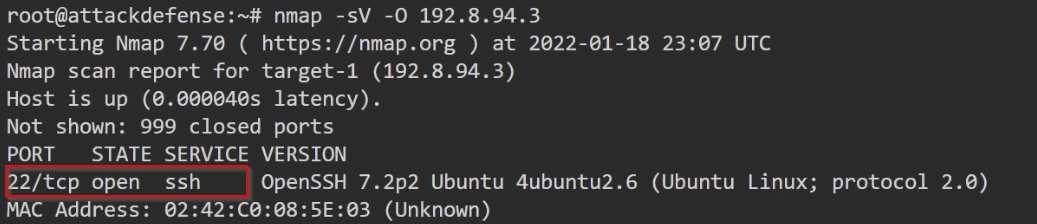
Now that we have identified the target's IP address, we can perform a quick Nmap service version detection scan to identify the open ports running on the target and the corresponding services.
This can be done by running the following command:
```
nmap -sV -O 192.8.94.3
```
As shown in the following screenshot, this scan reveals that the target only has port 22 open running SSH.
**Banner grabbing with Nmap scripts**
In certain cases, a traditional Nmap service version detection scan may not reveal accurate information about the exact version of a service that is running on a target system.
As a result, you may need to manually interact with a port to identify the exact service version.
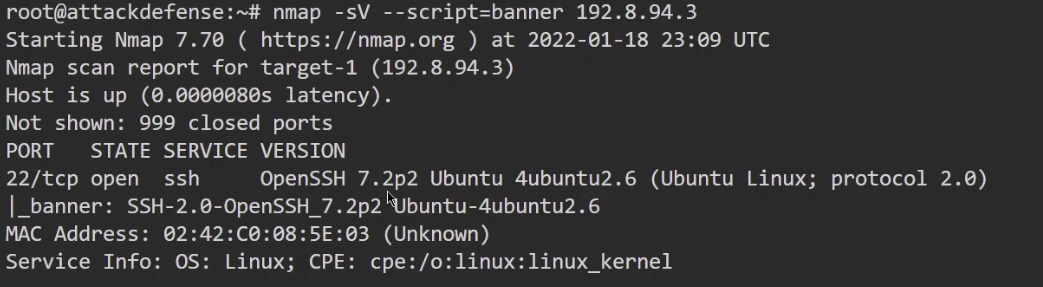
Banner grabbing can be automated through the use of an Nmap script. In this case, we will be using the **banner.nse** script.
You can run the Nmap script when performing an Nmap scan on the target system by running the following command:
```
nmap -sV --script=banner 192.8.94.3
```
As shown in the following screenshot, the **banner.nse** script does not reveal any new information regarding the version of OpenSSH running on port 22.
While banner grabbing may not reveal any new information about a service running on a target, in certain cases where Nmap cannot detect the exact version of a service running on a port, you will need to revert to manual banner grabbing.
#### Banner grabbing with Netcat
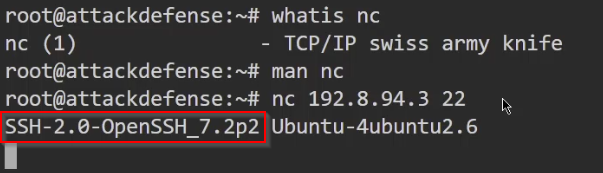
Netcat can be used to perform banner grabbing manually on a port by directly connecting to it.
This can be done by running the following command:
```
nc 192.8.94.3 22
```
Netcat will connect to the port and will display the banner of the service running on that port.
As shown in the following screenshot, we can confirm that **OpenSSH 7.2p2** is running on port 22 on the target.