> For the complete documentation index, see [llms.txt](https://notes.cavementech.com/pentesting-quick-reference/llms.txt). Markdown versions of documentation pages are available by appending `.md` to page URLs; this page is available as [Markdown](https://notes.cavementech.com/pentesting-quick-reference/port-53-dns.md).
# Port 53 DNS
udp
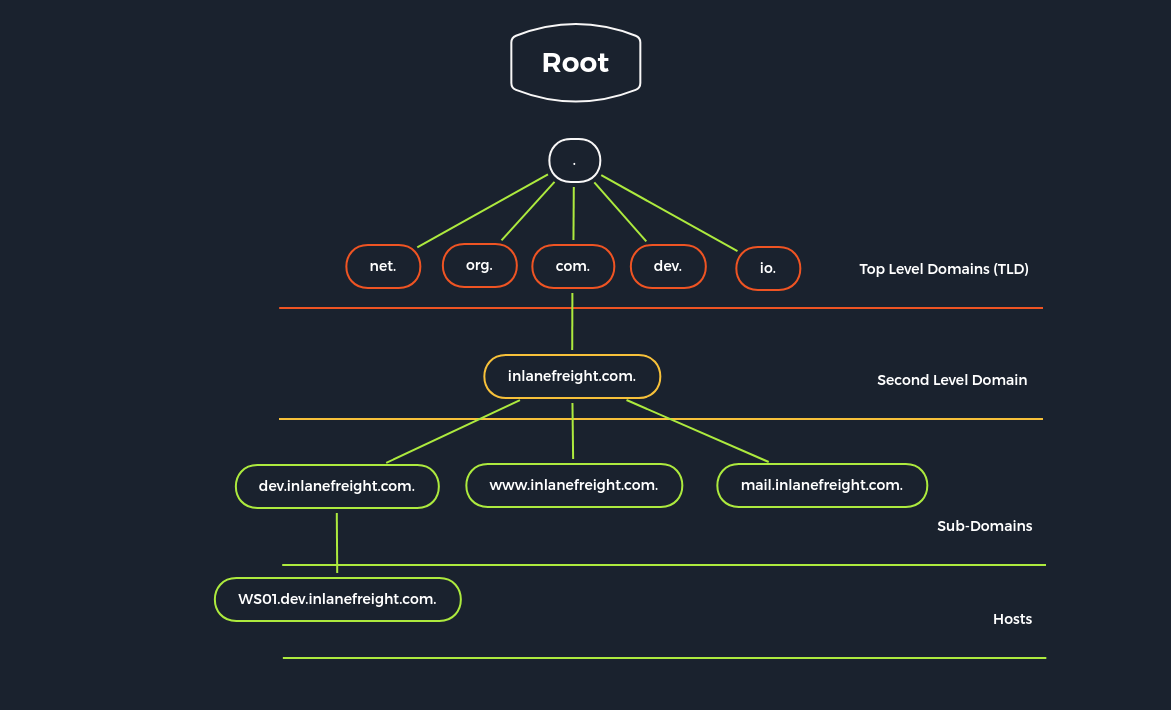
`Domain Name System` (`DNS`) is an integral part of the Internet. For example, through domain names, such as [academy.hackthebox.com](https://academy.hackthebox.com/) or [www.hackthebox.com](https://www.hackthebox.eu/), we can reach the web servers that the hosting provider has assigned one or more specific IP addresses. DNS is a system for resolving computer names into IP addresses, and it does not have a central database. Simplified, we can imagine it like a library with many different phone books. The information is distributed over many thousands of name servers. Globally distributed DNS servers translate domain names into IP addresses and thus control which server a user can reach via a particular domain. There are several types of DNS servers that are used worldwide:
* DNS root server
* Authoritative name server
* Non-authoritative name server
* Caching server
* Forwarding server
* Resolver
| **Server Type** | **Description** |
| ------------------------------ | ---------------------------------------------------------------------------------------------------------------------------------------------------------------------------------------------------------------------------------------------------------------------------------------------------------------------------------------------------------------------------------------------------------------------------------------------------------------------------------------- |
| `DNS Root Server` | The root servers of the DNS are responsible for the top-level domains (`TLD`). As the last instance, they are only requested if the name server does not respond. Thus, a root server is a central interface between users and content on the Internet, as it links domain and IP address. The [Internet Corporation for Assigned Names and Numbers](https://www.icann.org/) (`ICANN`) coordinates the work of the root name servers. There are `13` such root servers around the globe. |
| `Authoritative Nameserver` | Authoritative name servers hold authority for a particular zone. They only answer queries from their area of responsibility, and their information is binding. If an authoritative name server cannot answer a client's query, the root name server takes over at that point. |
| `Non-authoritative Nameserver` | Non-authoritative name servers are not responsible for a particular DNS zone. Instead, they collect information on specific DNS zones themselves, which is done using recursive or iterative DNS querying. |
| `Caching DNS Server` | Caching DNS servers cache information from other name servers for a specified period. The authoritative name server determines the duration of this storage. |
| `Forwarding Server` | Forwarding servers perform only one function: they forward DNS queries to another DNS server. |
| `Resolver` | Resolvers are not authoritative DNS servers but perform name resolution locally in the computer or router. |
DNS is mainly unencrypted. Devices on the local WLAN and Internet providers can therefore hack in and spy on DNS queries. Since this poses a privacy risk, there are now some solutions for DNS encryption. By default, IT security professionals apply `DNS over TLS` (`DoT`) or `DNS over HTTPS` (`DoH`) here. In addition, the network protocol `DNSCrypt` also encrypts the traffic between the computer and the name server.
However, the DNS does not only link computer names and IP addresses. It also stores and outputs additional information about the services associated with a domain. A DNS query can therefore also be used, for example, to determine which computer serves as the e-mail server for the domain in question or what the domain's name servers are called.
Different `DNS records` are used for the DNS queries, which all have various tasks. Moreover, separate entries exist for different functions since we can set up mail servers and other servers for a domain.
| **DNS Record** | **Description** |
| -------------- | ------------------------------------------------------------------------------------------------------------------------------------------------------------------------------------------------------------------------------------------------------------------------------------------- |
| `A` | Returns an IPv4 address of the requested domain as a result. |
| `AAAA` | Returns an IPv6 address of the requested domain. |
| `MX` | Returns the responsible mail servers as a result. |
| `NS` | Returns the DNS servers (nameservers) of the domain. |
| `TXT` | This record can contain various information. The all-rounder can be used, e.g., to validate the Google Search Console or validate SSL certificates. In addition, SPF and DMARC entries are set to validate mail traffic and protect it from spam. |
| `CNAME` | This record serves as an alias for another domain name. If you want the domain [www.hackthebox.eu](http://www.hackthebox.eu) to point to the same IP as hackthebox.eu, you would create an A record for hackthebox.eu and a CNAME record for [www.hackthebox.eu](http://www.hackthebox.eu). |
| `PTR` | The PTR record works the other way around (reverse lookup). It converts IP addresses into valid domain names. |
| `SOA` | Provides information about the corresponding DNS zone and email address of the administrative contact. |
### Zone Transfer
`Zone transfer` refers to the transfer of zones to another server in DNS, which generally happens over TCP port 53. This procedure is abbreviated `Asynchronous Full Transfer Zone` (`AXFR`). Since a DNS failure usually has severe consequences for a company, the zone file is almost invariably kept identical on several name servers. When changes are made, it must be ensured that all servers have the same data. Synchronization between the servers involved is realized by zone transfer. Using a secret key `rndc-key`, which we have seen initially in the default configuration, the servers make sure that they communicate with their own master or slave. Zone transfer involves the mere transfer of files or records and the detection of discrepancies in the data sets of the servers involved.
The original data of a zone is located on a DNS server, which is called the `primary` name server for this zone. However, to increase the reliability, realize a simple load distribution, or protect the primary from attacks, one or more additional servers are installed in practice in almost all cases, which are called `secondary` name servers for this zone. For some `Top-Level Domains` (`TLDs`), making zone files for the `Second Level Domains` accessible on at least two servers is mandatory.
DNS entries are generally only created, modified, or deleted on the primary. This can be done by manually editing the relevant zone file or automatically by a dynamic update from a database. A DNS server that serves as a direct source for synchronizing a zone file is called a master. A DNS server that obtains zone data from a master is called a slave. A primary is always a master, while a secondary can be both a slave and a master.
The slave fetches the `SOA` record of the relevant zone from the master at certain intervals, the so-called refresh time, usually one hour, and compares the serial numbers. If the serial number of the SOA record of the master is greater than that of the slave, the data sets no longer match.
#### **DIG - AXFR Zone Transfer**
```shell-session
[!bash!]$ dig axfr inlanefreight.htb @10.129.14.128
; <<>> DiG 9.16.1-Ubuntu <<>> axfr inlanefreight.htb @10.129.14.128
;; global options: +cmd
inlanefreight.htb. 604800 IN SOA inlanefreight.htb. root.inlanefreight.htb. 2 604800 86400 2419200 604800
inlanefreight.htb. 604800 IN TXT "MS=ms97310371"
inlanefreight.htb. 604800 IN TXT "atlassian-domain-verification=t1rKCy68JFszSdCKVpw64A1QksWdXuYFUeSXKU"
inlanefreight.htb. 604800 IN TXT "v=spf1 include:mailgun.org include:_spf.google.com include:spf.protection.outlook.com include:_spf.atlassian.net ip4:10.129.124.8 ip4:10.129.127.2 ip4:10.129.42.106 ~all"
inlanefreight.htb. 604800 IN NS ns.inlanefreight.htb.
app.inlanefreight.htb. 604800 IN A 10.129.18.15
internal.inlanefreight.htb. 604800 IN A 10.129.1.6
mail1.inlanefreight.htb. 604800 IN A 10.129.18.201
ns.inlanefreight.htb. 604800 IN A 10.129.34.136
inlanefreight.htb. 604800 IN SOA inlanefreight.htb. root.inlanefreight.htb. 2 604800 86400 2419200 604800
;; Query time: 4 msec
;; SERVER: 10.129.14.128#53(10.129.14.128)
;; WHEN: So Sep 19 18:51:19 CEST 2021
;; XFR size: 9 records (messages 1, bytes 520)
```
If the administrator used a subnet for the `allow-transfer` option for testing purposes or as a workaround solution or set it to `any`, everyone would query the entire zone file at the DNS server. In addition, other zones can be queried, which may even show internal IP addresses and hostnames.
#### **DIG - AXFR Zone Transfer - Internal**
```shell-session
[!bash!]$ dig axfr internal.inlanefreight.htb @10.129.14.128
; <<>> DiG 9.16.1-Ubuntu <<>> axfr internal.inlanefreight.htb @10.129.14.128
;; global options: +cmd
internal.inlanefreight.htb. 604800 IN SOA inlanefreight.htb. root.inlanefreight.htb. 2 604800 86400 2419200 604800
internal.inlanefreight.htb. 604800 IN TXT "MS=ms97310371"
internal.inlanefreight.htb. 604800 IN TXT "atlassian-domain-verification=t1rKCy68JFszSdCKVpw64A1QksWdXuYFUeSXKU"
internal.inlanefreight.htb. 604800 IN TXT "v=spf1 include:mailgun.org include:_spf.google.com include:spf.protection.outlook.com include:_spf.atlassian.net ip4:10.129.124.8 ip4:10.129.127.2 ip4:10.129.42.106 ~all"
internal.inlanefreight.htb. 604800 IN NS ns.inlanefreight.htb.
dc1.internal.inlanefreight.htb. 604800 IN A 10.129.34.16
dc2.internal.inlanefreight.htb. 604800 IN A 10.129.34.11
mail1.internal.inlanefreight.htb. 604800 IN A 10.129.18.200
ns.internal.inlanefreight.htb. 604800 IN A 10.129.34.136
vpn.internal.inlanefreight.htb. 604800 IN A 10.129.1.6
ws1.internal.inlanefreight.htb. 604800 IN A 10.129.1.34
ws2.internal.inlanefreight.htb. 604800 IN A 10.129.1.35
wsus.internal.inlanefreight.htb. 604800 IN A 10.129.18.2
internal.inlanefreight.htb. 604800 IN SOA inlanefreight.htb. root.inlanefreight.htb. 2 604800 86400 2419200 604800
;; Query time: 0 msec
;; SERVER: 10.129.14.128#53(10.129.14.128)
;; WHEN: So Sep 19 18:53:11 CEST 2021
;; XFR size: 15 records (messages 1, bytes 664)
```
The individual `A` records with the hostnames can also be found out with the help of a brute-force attack. To do this, we need a list of possible hostnames, which we use to send the requests in order. Such lists are provided, for example, by [SecLists](https://github.com/danielmiessler/SecLists/blob/master/Discovery/DNS/subdomains-top1million-5000.txt).
An option would be to execute a `for-loop` in Bash that lists these entries and sends the corresponding query to the desired DNS server.
### DNS Enumeration
#### dig
find the nameserver of a domain
```
dig ns zonetransfer.me
```
Now try the zone transfer for the domain from its primary and secondary name servers
```
dig axfr zonetransfer.me @nsztm2.digi.ninja
```
#### Host
Host provides a simple way to perform DNS lookups and retrieve DNS records.
```
host zonetransfer.me
```
zone transfer
```
host -t ns zonetransfer.me
host –l zonetransfer.me nsztm2.digi.ninja
```
#### nslookup
fire up the tool on windows
```
nslookup
set querytype=ns
zonetransfer.me
server nsztm2.digi.ninja
```
Now execute the zone transfer
```
ls -d nsztm2.digi.ninja
```
### **DIG - Version Query**
Sometimes it is also possible to query a DNS server's version using a class CHAOS query and type TXT. However, this entry must exist on the DNS server. For this, we could use the following command:
```
[!bash!]$ dig CH TXT version.bind 10.129.120.85
; <<>> DiG 9.10.6 <<>> CH TXT version.bind
;; global options: +cmd
;; Got answer:
;; ->>HEADER<<- opcode: QUERY, status: NOERROR, id: 47786
;; flags: qr aa rd; QUERY: 1, ANSWER: 1, AUTHORITY: 0, ADDITIONAL: 1
;; ANSWER SECTION:
version.bind. 0 CH TXT "9.10.6-P1"
;; ADDITIONAL SECTION:
version.bind. 0 CH TXT "9.10.6-P1-Debian"
;; Query time: 2 msec
;; SERVER: 10.129.120.85#53(10.129.120.85)
;; WHEN: Wed Jan 05 20:23:14 UTC 2023
;; MSG SIZE rcvd: 101
```
### Zone transfer using DNSrecon
{% embed url="" %}
```
./dnsrecon.py -d zonetransfer.me -z
```
{% hint style="info" %}
-d target domain
-z DNSSEC Zone walk
{% endhint %}
#### Zone transfer
```
dnsrecon –d zonetransfer.me –t axfr
```
**Other tools**
{% embed url="" %}
### DNSenum (automated tool very good)
```
dnsenum zonetransfer.me
```
**Subdomain Brute Forcing**
```
[!bash!]$ dnsenum --dnsserver 10.129.14.128 --enum -p 0 -s 0 -o subdomains.txt -f /opt/useful/seclists/Discovery/DNS/subdomains-top1million-110000.txt inlanefreight.htb
dnsenum VERSION:1.2.6
----- inlanefreight.htb -----
Host's addresses:
__________________
Name Servers:
______________
ns.inlanefreight.htb. 604800 IN A 10.129.34.136
Mail (MX) Servers:
___________________
Trying Zone Transfers and getting Bind Versions:
_________________________________________________
unresolvable name: ns.inlanefreight.htb at /usr/bin/dnsenum line 900 thread 1.
Trying Zone Transfer for inlanefreight.htb on ns.inlanefreight.htb ...
AXFR record query failed: no nameservers
Brute forcing with /home/cry0l1t3/Pentesting/SecLists/Discovery/DNS/subdomains-top1million-110000.txt:
_______________________________________________________________________________________________________
ns.inlanefreight.htb. 604800 IN A 10.129.34.136
mail1.inlanefreight.htb. 604800 IN A 10.129.18.201
app.inlanefreight.htb. 604800 IN A 10.129.18.15
ns.inlanefreight.htb. 604800 IN A 10.129.34.136
...SNIP...
done.
```
### Fierce (supports bruteforcing)
```
fierce zonetransfer.me
fierce --domain zonetransfer.me --subdomain-file /usr/share/seclists/Discovery/DNS/fierce-hostlist.txt
```
### DNSMAP (Dns bruteforcing) too slow not recommended
```
dnsmap zonetransfer.me -w /usr/share/wordlist/Seclists/discovery/DNS/fierce-hostlists.txt
```
### DNS Enumeration using nmap
```
nmap --script=broadcast-dns-service-discovery zonetransfer.me
```
### DNS brute forcing
```
nmap -T5 -p 53 --script dns-brute zonetransfer.me
```
### Common service records
```
nmap --script dns-srv-enum --script-args "dns-srv-enum.domain='zonetransfer.me'"
```
