> For the complete documentation index, see [llms.txt](https://notes.cavementech.com/pentesting-quick-reference/llms.txt). Markdown versions of documentation pages are available by appending `.md` to page URLs; this page is available as [Markdown](https://notes.cavementech.com/pentesting-quick-reference/boxes-machines/ine/host-and-network-penetration-testing-network-based-attacks-ctf-1.md).
# Host & Network Penetration Testing: Network-Based Attacks CTF 1
Network and host-based penetration testing often involves analysing and uncovering details about services, vulnerabilities, and potential points of compromise. This lab focuses on post-exploitation activities such as analysing traffic to identify malicious activity, investigating infected hosts, and extracting critical information using forensic techniques.
In this scenario, a network has been compromised, and your objective is to analyze captured network traffic to extract key information about the attack. You will use tools like Wireshark to examine network activity and identify malicious actions, affected systems, and associated artifacts.
In this lab environment, you will have GUI access to a Kali machine with access to a captured network packet file **test.pcap**.
**Objective:** Use network analysis techniques to identify and capture the following flags related to the infection and attack:
* **Flag 1:** What is the domain name(abcd.site) accessed by the infected user that returned a 200 OK response code?
* **Flag 2:** What is the IP address, MAC address of the infected Windows client?
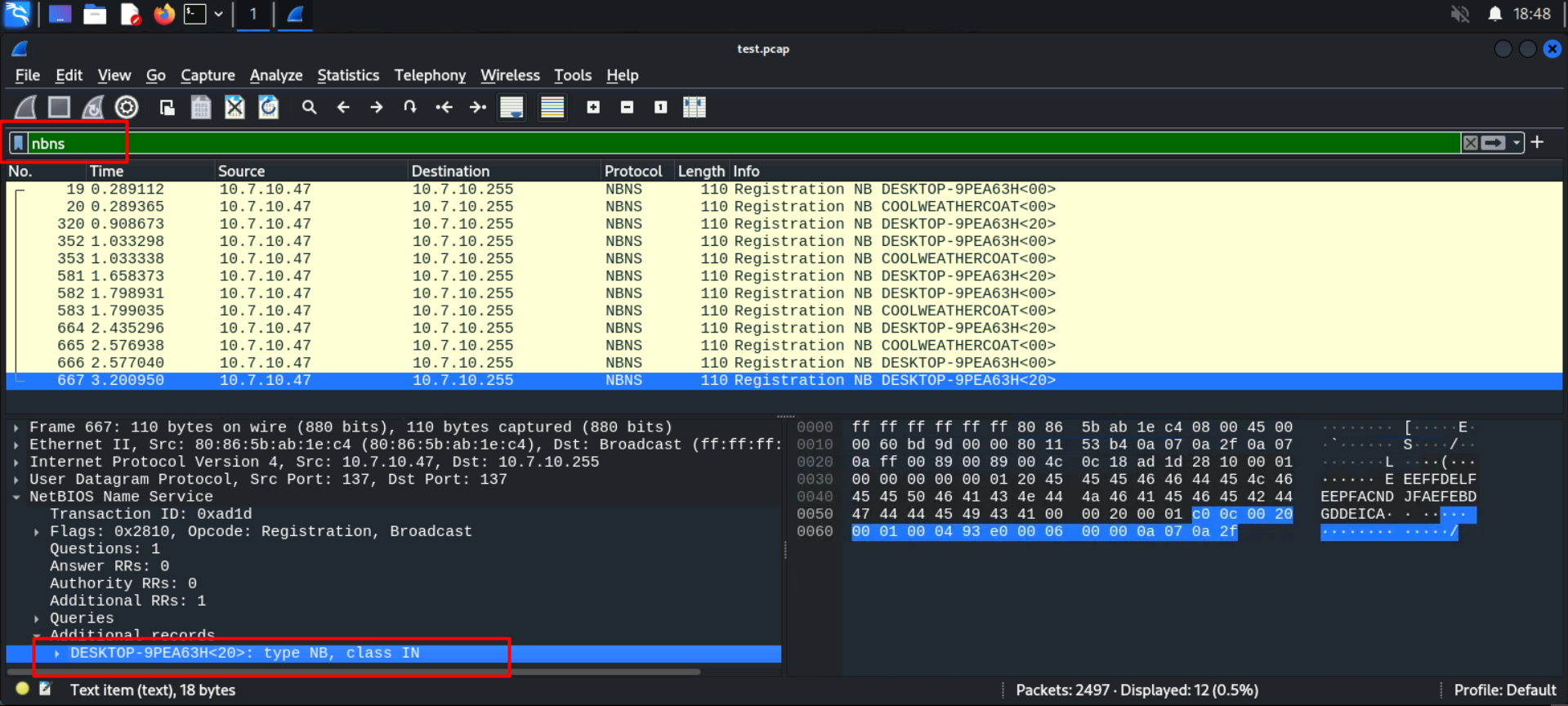
* **Flag 3:** Which Wireshark filter can you use to determine the victim’s hostname from NetBIOS Name Service traffic, and what is the detected hostname for this malware infection?
* **Flag 4:** Which user got infected and ran the mystery\_file.ps1 PowerShell script?
* **Flag 5:** What User-Agent string indicates the traffic generated by a PowerShell script?
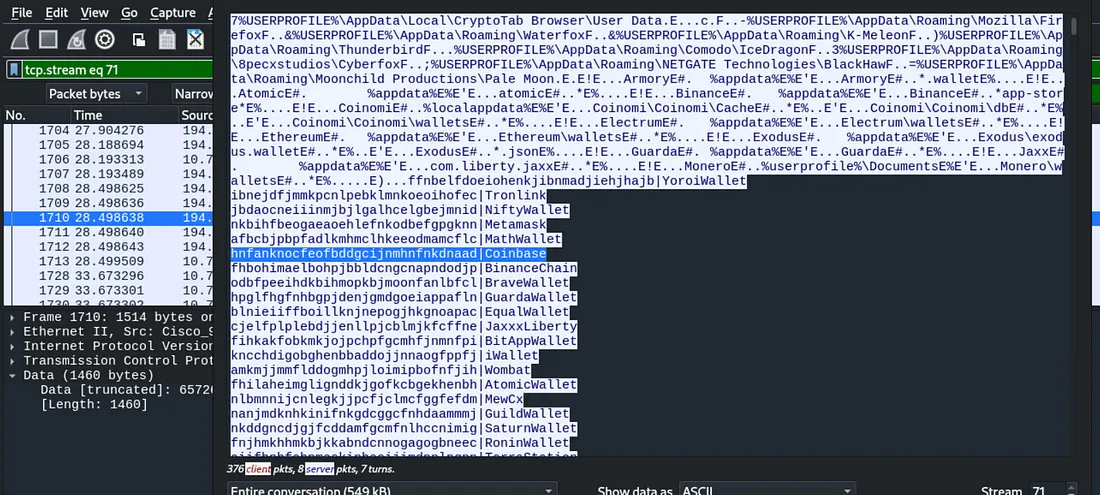
* **Flag 6:** Which wallet extension ID is associated with the Coinbase wallet?
#### Flag 1: What is the URL accessed by the infected user that returned a 200 OK response code.
```
1. open test.pcap file in wireshark
2. use filter : http.response.code == 200
3. check for Hypertext Transfer Protocol section
4. then check for parameter requested URI : http://623start.site/?status=install
```
{% hint style="info" %}
623start.site
{% endhint %}
### **Flag 2:** What is the IP address, MAC address of the infected Windows client?
To identify the infected Windows client, focus on the traffic that went through HTTP. Use the following filter in Wireshark: `http`
This will display all HTTP traffic, helping you locate the necessary information.
At the top, you can see a request mentioning Windows Defender. From this, identify the source IP address and copy it. The IP address is: 10.7.10.47.
To find the MAC address, expand the Ethernet II section and note the source MAC address.
```
1. Go to a packet and expand:
2. Ethernet II ➝ You'll find MAC address
3. Internet Protocol ➝ You'll find IP address
```
{% hint style="info" %}
10.7.10.47, 80:86:5b:ab:1e:c4
{% endhint %}
### **Flag 3:** Which Wireshark filter can you use to determine the victim’s hostname from NetBIOS Name Service traffic, and what is the detected hostname for this malware infection?
```
1. use filter nbns
2. check for the hostname section
```
{% hint style="info" %}
nbns, DESKTOP-9PEA63H
{% endhint %}
### Flag 4: Which user got infected and ran the mystery\_file.ps1 PowerShell script?
To find this, clear all the filters and press **CTRL+F** to search.
Change the **Display Filter** to **String** and enter the file name you are looking for: `mystery_file.ps1`. Then, search using **Packet bytes** on the left side of the **Find** functionality and click on find.
Copy the content on the right side by right-clicking and selecting **as Printable Text**.
Paste the content into a text editor, like Notepad, to enumerate. After enumerating, we find the user, which is: `rwalters`.
{% hint style="info" %}
rwalters
{% endhint %}
### **Flag 5:** What User-Agent string indicates the traffic generated by a PowerShell script?
To find this, press **CTRL+F** to search. In the **String** parameter, type `PowerShell`, and search using **Packet Details** on the left side of the **Find** functionality.
Expand the **Hypertext Transfer Protocol** section and copy the `User-Agent` from there.
Now, the funny part is that the entire **User-Agent** is not the answer. Only the name of PowerShell, which is: `WindowsPowerShell` :)
{% hint style="info" %}
WindowsPowerShell
{% endhint %}
### **Flag 6:** Which wallet extension ID is associated with the Coinbase wallet?
To find this, press CTRL+F to search. In the String parameter, type Coinbase and search using Packet Bytes on the left side of the Find functionality.
Here, we found some details for Coinbase. Right-click the main request and select Follow > TCP Stream Ctrl+Alt+Shift+T.
Here, we found our last flag, which is:
{% hint style="info" %}
hnfanknocfeofbddgcijnmhnfnkdnaad
{% endhint %}