> For the complete documentation index, see [llms.txt](https://notes.cavementech.com/pentesting-quick-reference/llms.txt). Markdown versions of documentation pages are available by appending `.md` to page URLs; this page is available as [Markdown](https://notes.cavementech.com/pentesting-quick-reference/boxes-machines/ine/host-and-network-penetration-testing-exploitation-ctf-2.md).
# Host & Network Penetration Testing: Exploitation CTF 2
This lab focuses on exploiting a Windows target machine. By identifying services, analyzing misconfigurations, and leveraging discovered credentials, you'll uncover and capture the flags. Tasks involve exploiting SMB misconfigurations, utilizing NTLM hashes, and gaining access to the system.
A target machine is accessible at **target.ine.local**. Identify the services and capure the flags.
* **Flag 1:** Looks like smb user **tom** has not changed his password from a very long time.
* **Flag 2:** Using the NTLM hash list discovered in the previous challenge, can you compromise the smb user **nancy**?
* **Flag 3:** I wonder what the hint found in the previous challenge be useful for!
* **Flag 4:** Can you compromise the target machine and retrieve the **C://flag4.txt** file?
The following wordlist will be useful:
* /usr/share/wordlists/metasploit/unix\_passwords.txt
### **Flag 1:** Looks like smb user **tom** has not changed his password from a very long time.
#### Scanning
```
┌──(root㉿INE)-[~]
└─# nmap -sC -sV -O target.ine.local
Starting Nmap 7.94SVN ( https://nmap.org ) at 2025-12-17 19:28 IST
Nmap scan report for target.ine.local (10.5.26.117)
Host is up (0.0026s latency).
Not shown: 989 closed tcp ports (reset)
PORT STATE SERVICE VERSION
21/tcp open ftp Microsoft ftpd
| ftp-syst:
|_ SYST: Windows_NT
80/tcp open http Microsoft IIS httpd 8.5
|_http-server-header: Microsoft-IIS/8.5
|_http-title: IIS Windows Server
| http-methods:
|_ Potentially risky methods: TRACE
135/tcp open msrpc Microsoft Windows RPC
139/tcp open netbios-ssn Microsoft Windows netbios-ssn
445/tcp open microsoft-ds?
3389/tcp open ssl/ms-wbt-server?
| ssl-cert: Subject: commonName=WIN-M878Q9NE9S6
| Not valid before: 2025-12-16T13:56:19
|_Not valid after: 2026-06-17T13:56:19
| rdp-ntlm-info:
| Target_Name: WIN-M878Q9NE9S6
| NetBIOS_Domain_Name: WIN-M878Q9NE9S6
| NetBIOS_Computer_Name: WIN-M878Q9NE9S6
| DNS_Domain_Name: WIN-M878Q9NE9S6
| DNS_Computer_Name: WIN-M878Q9NE9S6
| Product_Version: 6.3.9600
|_ System_Time: 2025-12-17T14:00:09+00:00
|_ssl-date: 2025-12-17T14:00:17+00:00; 0s from scanner time.
49152/tcp open msrpc Microsoft Windows RPC
49153/tcp open msrpc Microsoft Windows RPC
49154/tcp open msrpc Microsoft Windows RPC
49155/tcp open msrpc Microsoft Windows RPC
49167/tcp open msrpc Microsoft Windows RPC
```
So, the **SMB service** is running on **port 445**, and as the question suggests, user **Tom** has a weak password. Let’s attempt to brute-force the password using **CrackMapExec**.
We can use tools like **Hydra, CrackMapExec, or a Metasploit module** for brute-forcing, but in this case, we’ll use **CrackMapExec**.
```
crackmapexec smb target.ine.local -u tom -p /usr/share/metasploit-framework/data/wordlists/unix_passwords.txt
```
And here we have successfully obtained the password: **felipe**.
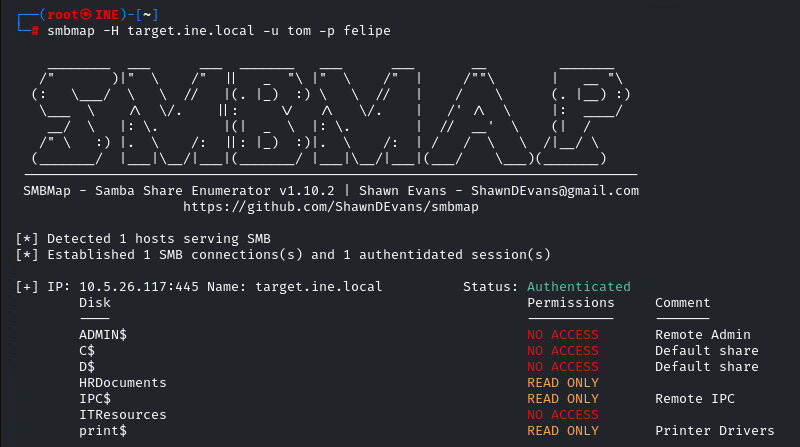
Now, we can enumerate the shares accessible to Tom and analyze his permissions using SMBMap. This will help us understand what operations he can perform on the system.
```
smbmap -H target.ine.local -u tom -p felipe
```
Now that we know there are only three shares with **read-only** access, let’s connect to the **HRDocuments** share using the following command:
```
smbclient //target.ine.local/HRDocuments -U tom
```
After connecting to the **HRDocuments** share, type the `ls` command to list the available files. Here, we find **flag1.txt** and **leaked-hashes.txt**.
To download these files, use the `get` command as follows:
Now, use the `cat` command to read the contents of **flag1.txt**. Here, we obtain our first flag:
### **Q.2 Using the NTLM hash list discovered in the previous challenge, can you compromise the smb user nancy?**
In the previous step, we discovered **leaked-hashes.txt**, which contains NTLM hashes.
Since the question asks us to compromise the **Nancy** user, we can use the **Metasploit** module `scanner/smb/smb_login` to attempt authentication using the leaked NTLM hash.
First, type `options` to list the required options for the module.
Now, set the following options for the **Metasploit** module `scanner/smb/smb_login`:
**RHOSTS**: Set the target IP address or hostname which is `target.ine.local` .
**PASS\_FILE**: Set the path to the file containing the NTLM hashes which is `lekaded-hashes.txt`.
**SMBUser**: Set the SMB username, which is `nancy`.
To create a session upon successful authentication, we need to set **CreateSession** to **true**. Once this is done, we can run the module to attempt compromising the SMB user **Nancy**.
We have successfully compromised the ‘nancy’ user. To view the active sessions, type the command `sessions`. To interact with the session, use the following command: `sessions 1`.
To list the shares available for the ‘nancy’ user, use the command: `shares`.
We don’t have access to the `HRDocuments` share. Let's connect to the `ITResources` share by using the command: `shares -i ITResources`. Then, use the `ls` command to list the contents of the directory.
To retrieve this flag, use the `download` command. And also download the **hint.txt** file.
Press enter or click to view image in full size
Use the `cat` command to read its contents. This is where we find our second flag, which is:
### **Q.3 I wonder what the hint found in the previous challenge be useful for!**
In the beginning, we enumerated the services running on the domain. Now, let’s try connecting to the FTP service using the credentials found in `hint.txt`. To connect to FTP, type the command: `ftp target.ine.local`, and enter the credentials when prompted.
We have successfully connected to the FTP server. To view the contents, type the `dir` command.
Here, we find our third flag, which is:
### **Q.4 Can you compromise the target machine and retrieve the C://flag4.txt file?**
After further analysis, we see that port 80 is open and we have FTP access. Enumeration shows that FTP is linked to this port, meaning any files uploaded will be reflected on the website. Since the server is running IIS, we can upload an ASPX shell.
Let’s create the ASPX shell using `msfvenom` with the following command:
```
// Some code
```
**Note**: Use your IP address for LHOST.
Press enter or click to view image in full size
Upload the shell to FTP using the `put` command.
Then, use the `msfconsole` module `/multi/handler` to handle the incoming connection. Set these three parameters: `PAYLOAD`, `LHOST`, and `LPORT`, which were configured in the `msfvenom` payload.
Navigate to `http://target.ine.local/shell.aspx` in the browser. You should observe that we have successfully obtained the shell.
To retrieve the last flag, type: `cat C://flag4.txt`.
**Thank you, everyone, for reading!**