> For the complete documentation index, see [llms.txt](https://notes.cavementech.com/pentesting-quick-reference/llms.txt). Markdown versions of documentation pages are available by appending `.md` to page URLs; this page is available as [Markdown](https://notes.cavementech.com/pentesting-quick-reference/vulnerability-assessment/vulnerability-scanning-using-nmap.md).
# Vulnerability Scanning using Nmap
### Performing a ShellShock vulnerability scan with Nmap
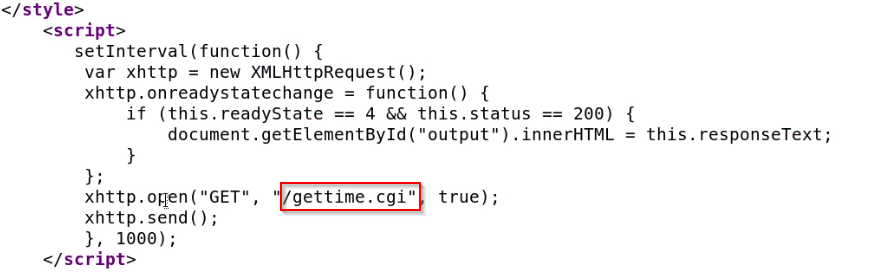
we can view the source of the homepage by right clicking on the page and clicking on "View Selection Source"
As shown in the following screenshot, the source code of the webpage contains a JavaScript block that is executing a CGI script called **gettime.cgi**.
This is looks very interesting as the target may be vulnerable to the ShellShock exploit as the site is executing a CGI script that is responsible for displaying the countdown timer.
**Note:** A CGI script is a script that runs on a web server that is able to execute system level commands and display the output on the web server.
**What is ShellShock?** ShellShock is a vulnerability that affects Bash versions 1.0.3-4.3 and allows attackers to remotely execute commands on a Linux target by injecting malicious HTTP headers.
While we are able to identify a CGI script running on a the web server, we still need to conclusively identify whether the web server is vulnerable to the ShellShock exploit.
Luckily for us, Nmap provides us with an Nmap script to do just this. We can run the **http-shellshock.nse** script on the target by running the following command:
```
nmap -sV -p 80 --script=http-shellshock --script-args "http-shellshock.uri=/gettime.cgi" 192.152.25.3
```
**Note:**The**--script-args** parameter allows us to specify the URI of the CGI script that is running on the web server.
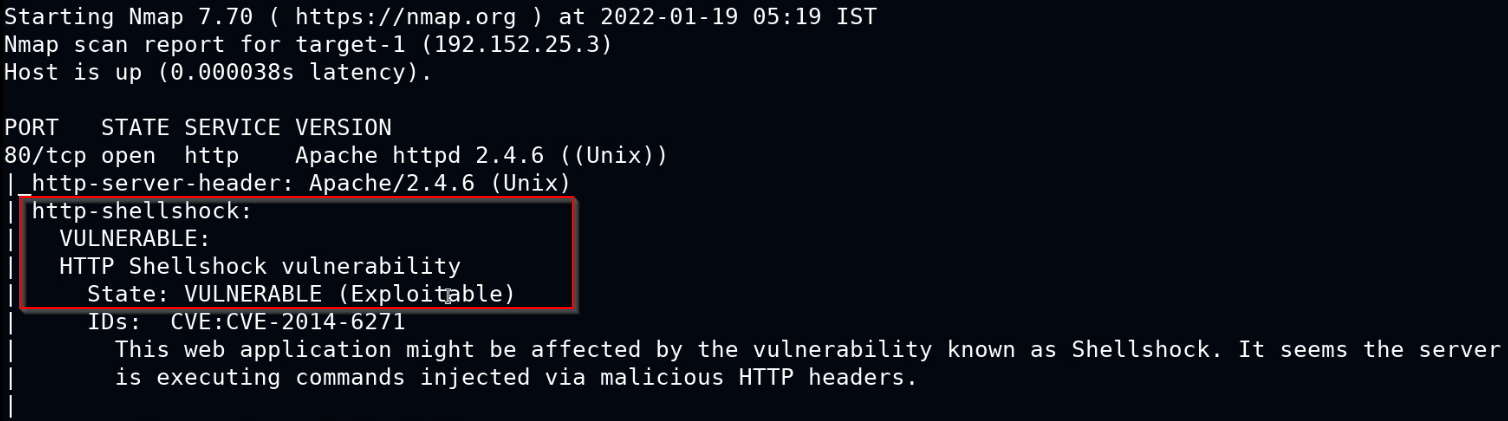
As shown in the following screenshot, the Nmap script scan reveals that the web server running on the target is vulnerable to the ShellShock exploit.
This is just one example of how Nmap can be used to perform vulnerability scans, Nmap also provides you with a large collection of vulnerability scanning scripts that can be accessed by running the following command:
```
ls -al /usr/share/nmap/scripts | grep vuln
```
This will give you a list of Nmap scripts that can be used to identify specific vulnerabilities on a target system.